Picture the scene. You just joined as an engineer at a digital bank or a payment processing company. The team shows you a system that generates PDF bank slips, saves them somewhere, and serves a download link to the customer. Seems simple. That simplicity is exactly where the danger hides, because "simple" starts to fall apart the moment ten thousand customers try to download their bank slips at the same time, or when someone asks "what if an attacker deletes everything?", or when the finance team wants to know why the cloud bill doubled in three months.
A boleto bancário — or bank slip — is a Brazilian payment instrument used for billing. It carries the payer's personal data (full name, CPF tax ID, address) and has direct monetary value, which makes it a concrete case study for regulated data storage.
This text starts from a version zero of this backend in Java with Azure Blob Storage and adds layer by layer until a defensible architecture. Each new concept is explained before it is used: what it is, what role it plays, and why it exists. The failures along the way come from documented incidents, with verifiable sources from Microsoft, OWASP, and security researchers. Every decision carries an explicit trade-off between security, cost, operations, and performance, and by the end you will be able to argue for each choice, not just implement it.
Before anything: why not send the PDF as Base64 inside the JSON
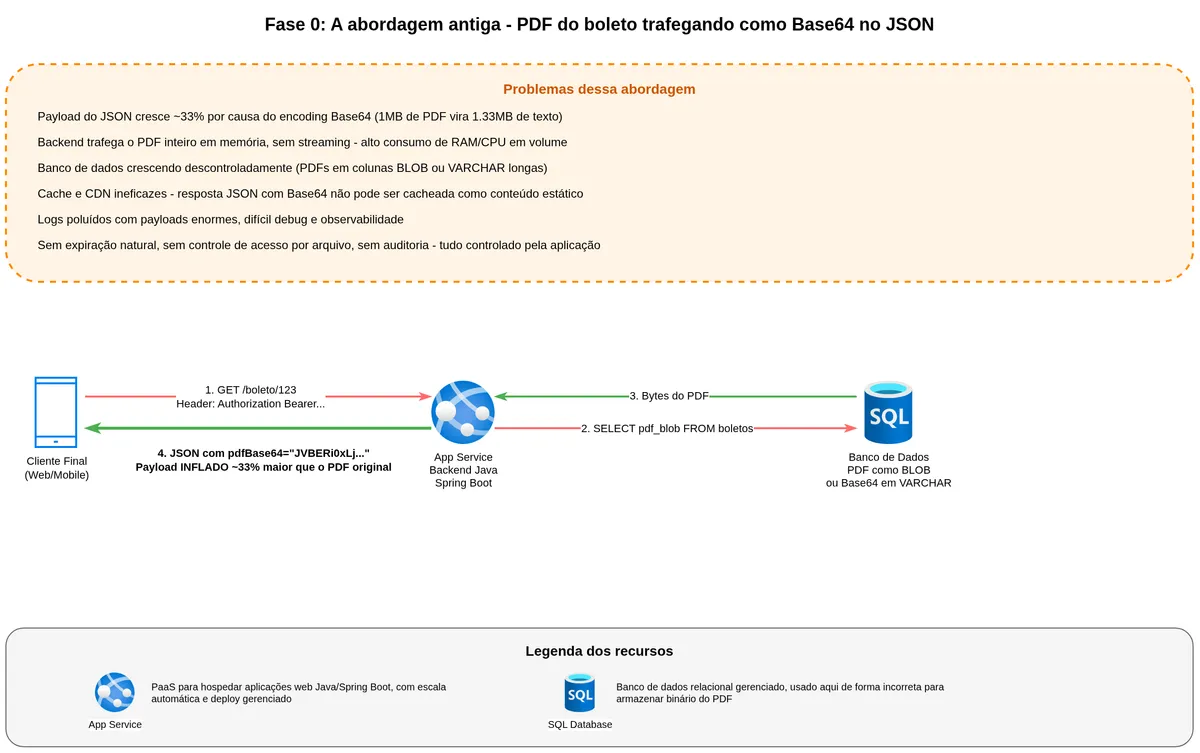
Before standing up a single piece of infrastructure, it is worth discussing a decision that appears early in file-handling systems and that many engineers inherit when joining an existing project. The backend generates the PDF, encodes it as Base64, and returns a large string inside a JSON field. The client decodes and renders or saves the file. Integration done.
This pattern is common enough that it is worth understanding what it offers before explaining why we are abandoning it.
Why this pattern caught on
The first reason is historical and practical. REST APIs deal in JSON, and JSON has no native support for raw binary. Encoding as Base64 is the most immediate way to pack bytes into a text envelope. It eliminates the need to deal with multipart/form-data, separate file uploads, two-step download flows — everything fits in a single endpoint, a single contract.
The second reason is compatibility. Virtually every language and SDK can encode and decode Base64 in one line. The frontend takes the string, prepends data:application/pdf;base64,... and renders directly in the browser without opening a new tab or calling a second URL. For quick prototypes, this shortcut is tempting and functional while volume is low.
Where it breaks when the system grows
Start with the math. Base64 encodes three binary bytes into four ASCII characters — the result is approximately 33% larger than the original file. A 1 MB PDF becomes 1.33 MB traveling over the network. With a hundred thousand customers retrieving bank slips at the start of the month, that 33% overhead becomes gigabytes of unnecessary bandwidth and egress costs.
The second problem is memory. To return the JSON, the backend must load the entire PDF into memory, encode it, build the string, and only then respond. This breaks any possibility of streaming. Everything becomes a monolithic blob the backend holds on the heap until the response exits. At scale this means memory spikes, aggressive garbage collection, and instances forced to scale for the worst case.
The third problem is caching. Static binary content is the golden use case for CDNs. You can cache at the edge, serve with minimal latency, without touching the backend. When the PDF is inside JSON, the JSON varies by user, by bank slip, by context, and no intermediate layer can cache the binary separately from the metadata.
The fourth problem is operational. Logs, traces, and observability tools get polluted with enormous payloads. Debugging becomes painful. Masking personal data in logs also gets complicated — and here is a specific data protection exposure: the payer's name, CPF, and address travel into every log entry.
What cloud-native architecture proposes
In modern architectures — aligned with microservices, serverless, and the 12-factor principles — the separation is clean across three parts: an object store like Blob Storage holds binary content; the API returns a download URL (ideally pre-signed with a short TTL and scoped to that specific file); and when a service needs to deliver the file directly, it uses HTTP streaming with Content-Type: application/pdf without loading the entire file into memory.
This delivers four immediate gains. Less data travels over the network. The backend scales better because it stops loading files onto the heap. CDN caching becomes viable again because the URL points to a cacheable binary resource. The separation between metadata (line code, value, due date, status) and content (the PDF itself) becomes explicit in the contract.
By moving binary content out of the database, the system stops inflating tables with enormous BLOBs and VARCHARs and gives the database back its original purpose: storing queryable structured data.
Data protection starts here
When the bank slip travels as Base64 inside JSON, it spreads across places nobody mapped: application logs, retry headers, Kafka or Service Bus messages, APM traces, monitoring tool payloads. The payer's personal data travels with it into every one of those places. Each copy needs retention, access control, and deletion policies to satisfy data protection requirements — and in practice none of them were designed with that in mind.
By centralizing the bank slip in an object store with a short-lived pre-signed URL, the personal data lives in one known place with defined access control, auditing, retention, and deletion. The cloud-native approach solves the technical problem and provides the material foundation for compliance without depending on a manual process built after the fact.
What we are protecting before any line of code
Before any infrastructure, let us align on what the central object of this system is. A bank slip is a financial document with a due date, a value, and a barcode. It typically lives for weeks or months before the due date, becomes a payment record afterward, and in many scenarios must be retained for years due to tax and regulatory obligations, especially in financial products.
We are dealing with a file that has direct monetary value if tampered with, that carries personal data because it includes the payer's name, CPF (individual taxpayer ID), and CNPJ (corporate taxpayer ID), and that typically has regulatory retention requirements. All of this will weigh on every choice made further ahead. When immutability, lifecycle, and auditing come up, keep this context in mind — it is what gives weight to each decision.
"Immutable storage helps healthcare organizations, financial institutions, and related industries — particularly broker-dealer firms — to store data safely. Immutable storage can be leveraged in any scenario to protect critical data against modification or deletion." (Microsoft Learn, Overview of immutable storage for blob data)
Understanding where files will live: Storage Account, Container, and Blob
Before writing code, we need to understand the three concepts that form Azure Blob Storage's hierarchy. Confusing any of them will create design problems from the start.
The Storage Account is the storage account. Think of it as an exclusive postal address in the cloud — a global namespace with a name unique worldwide, which is why your storage URL ends with youraccount.blob.core.windows.net. It is also the billing unit and the security configuration unit. Firewall rules, geographic replication, encryption, and access control are all configured at this level.
The Container lives inside the Storage Account. It is a logical grouping of files, similar to a folder but without a real subfolder hierarchy (any "hierarchy" is just a naming convention using slashes). You can have separate containers for individual-customer bank slips, corporate-customer bank slips, or bank slips for a specific product. The container has its own access configuration: public, private, or policy-controlled.
The Blob is the file itself. The name comes from Binary Large Object — literally any sequence of bytes. A PDF, an image, a log, a video. Each blob has a name within the container, and that name forms the access key. The full address of any blob always follows the format https://account.blob.core.windows.net/container/blob-name.
flowchart TB
    SA[Storage Account
globally unique name] --> CA[Container: bank-slips-individual]
    SA --> CB[Container: bank-slips-corporate]
    SA --> CC[Container: contracts]
    CA --> B1[Blob: slip-abc123.pdf]
    CA --> B2[Blob: slip-def456.pdf]
    CB --> B3[Blob: slip-cnpj-001.pdf]
Why does this separation matter for security? Because each container can have an independent access policy. You can leave a company logos container public while the bank slips container is strictly private. Container granularity is the minimum you should think about when organizing your data.
Version zero: the code that works but is frightening
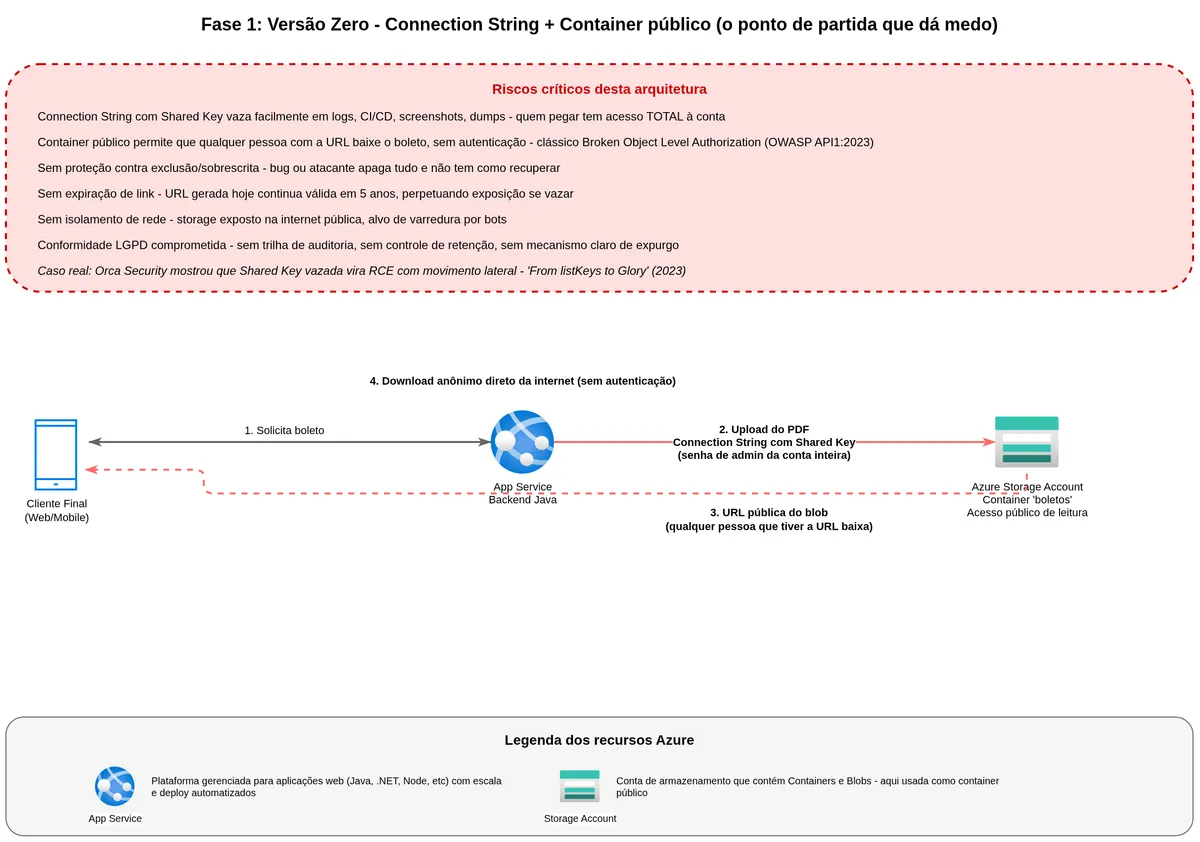
A Spring Boot service receives an HTTP request, generates the bank slip PDF, uploads it to Azure Blob Storage using an account key read from an environment variable, and returns a public URL for the blob. The code below is the anti-pattern: it works, but it exposes administrative credentials for the entire account. The rest of this article explains why that is dangerous and how to replace each part.
@Service
public class BoletoStorageService {

    private final BlobServiceClient blobServiceClient;
    private final String containerName = "boletos";

    public BoletoStorageService(@Value("${azure.storage.connection-string}") String conn) {
        this.blobServiceClient = new BlobServiceClientBuilder()
                .connectionString(conn)
                .buildClient();
    }

    public String upload(String fileName, byte[] pdf) {
        BlobContainerClient container = blobServiceClient.getBlobContainerClient(containerName);
        BlobClient blob = container.getBlobClient(fileName);
        blob.upload(BinaryData.fromBytes(pdf), true);
        return blob.getBlobUrl();
    }
}
The connection string has a format like DefaultEndpointsProtocol=https;AccountName=myaccount;AccountKey=AbCdEfGh...;EndpointSuffix=core.windows.net. It embeds the account name, the endpoint, and the Shared Key — the account access key.
Everything works. The team celebrates. The customer downloads the bank slip. QA signs off. That is when the experienced architect starts to feel uncomfortable.
flowchart LR
    A[Web/Mobile Client] -->|HTTPS| B[Java Backend
Spring Boot]
    B -->|Connection String
with Shared Key| C[(Azure Blob Storage
Container 'boletos')]
    B -->|Public Blob URL| A
    C -.->|Anonymous access
if container is public| A
What the Shared Key is and why it is dangerous
When you create a Storage Account, Azure automatically generates two 512-bit keys, called primary and secondary. These keys work as administrator passwords for the account. Any system or person presenting one of these keys to Azure can do absolutely everything: read, write, delete, list, reconfigure, and even generate other access tokens on the account's behalf. There is no permission hierarchy with the Shared Key — either you have it and can do everything, or you do not.
"Storage account access keys provide full access to the account data and the ability to generate SAS tokens." (Microsoft Learn, Manage account access keys)
The practical problem is that the connection string carrying that key ends up in environment variables, configuration files, CI/CD pipelines, application startup logs, and debugging screenshots in Slack. Once it leaks, the blast radius is total.
Orca Security documented in 2023 an attack path that starts exactly with obtaining a Shared Key from a Storage Account. From there, an attacker can escalate privileges within the Azure environment, compromise Azure Functions associated with the storage, and eventually execute remote code in other parts of the infrastructure.
"With this key, obtained via leakage or an appropriate AD role, an attacker not only gains full access to storage accounts and potentially critical business assets, but can also move laterally in the environment and even execute remote code." (Orca Security, From listKeys to Glory)
The public URL problem
If the container is configured for public read access, the URL the backend returns is accessible to anyone who has it. No password, no authentication, nothing. Just the URL.
Worse, if the file name is predictable — like boleto_12345.pdf — an attacker can enumerate IDs and download other customers' bank slips. This is exactly what OWASP calls Broken Object Level Authorization (BOLA), the top item on the API security threats list.
"Every API endpoint that receives an object ID and performs any type of action on the object should implement object-level authorization checks. The checks should validate that the logged-in user has permissions to perform the requested action on the requested object." (OWASP API Security, API1:2023 Broken Object Level Authorization)
Using a random GUID as the file name helps, but it does not fully solve the problem, because the URL still works for anyone who captures it via log, browser history, or a forwarded email.
From a data protection standpoint, this version zero has no effective access control, no mechanism to prevent one person from downloading another person's bank slip, and no trail of who accessed what. If a breach occurs in this design, the company cannot even determine its scope to report it within the legal deadline.
Let us fix these two problems in layers.
First layer: understanding identity before changing the code
To fix the Shared Key problem, I will introduce a different authentication approach. But before changing the code, three concepts need explanation — they chain together, and without understanding each one separately, the whole thing looks like magic.
What Microsoft Entra ID is
Microsoft Entra ID, formerly Azure Active Directory, is Microsoft's identity service for the cloud. Think of identity as a trust problem. When you enter a corporate building and show your badge to security, the guard trusts the badge because HR issued it. HR is the authority that says "this person is who they claim to be."
Entra ID plays exactly that role for software systems. It is the "digital registry" that says "this system or this person is who they claim to be." Every time a service needs to prove to another that it has permission to do something, it asks Entra ID for an identity document called a token. That token is digitally signed by Entra ID, and any service that trusts Entra ID can verify the token is legitimate without checking the source directly.
Technically, Entra ID implements OAuth 2.0 and OpenID Connect. Azure Storage, Azure Key Vault, Azure SQL, and others all trust Entra ID as the identity authority, meaning the same identity mechanism authorizes access to all of them.
What a Managed Identity is and why it exists
If Azure services need a token to talk to each other, how do they get that token without storing a password somewhere?
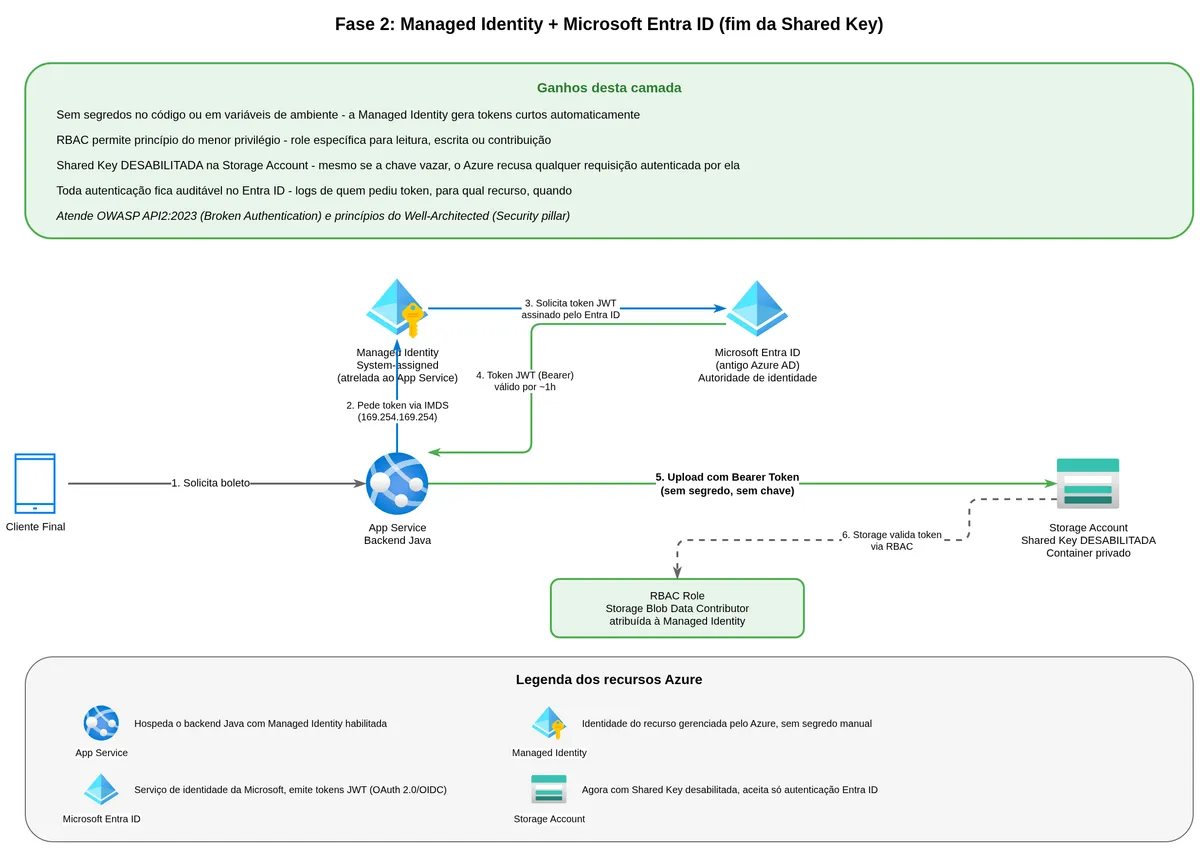
The answer is Managed Identity. It is an identity tied directly to a compute resource — an App Service, a Container App, or an Azure Function — and managed entirely by Azure. There is no password, no key, no secret for the developer to store or rotate.
How does it work? Azure creates and maintains a certificate bound to the resource. When the application inside that resource needs an access token, it calls a special endpoint available only within Azure infrastructure called IMDS (Instance Metadata Service). That endpoint responds with a JWT token signed by Entra ID, asserting the resource is authenticated. Token renewal happens automatically before expiration.
"A managed identity enables your app to securely connect to other Azure resources without the use of secret keys or other application secrets." (Microsoft Learn, Authenticate Azure-hosted Java apps by using a system-assigned managed identity)
There are two flavors. System-Assigned is created automatically when you enable the feature on the resource and shares the resource's lifecycle. User-Assigned is created separately as an independent resource and can be assigned to multiple resources — useful when several services need the same permissions.
What DefaultAzureCredential is
DefaultAzureCredential is a class in the Azure Java SDK that implements a chain of authentication attempts. In production, it tries to get a token via Managed Identity. In local development, it tries Azure CLI, then IntelliJ, then Visual Studio Code, in order. Whoever succeeds first wins.
This solves a significant practical problem: you write the same code for local and production without special variables or conditionals. Locally, the developer uses personal credentials via az login. In production, the Managed Identity takes over automatically.
"DefaultAzureCredential supports multiple authentication methods and determines which method to use at runtime. This approach enables your app to use different authentication methods in different environments (local vs. production) without implementing environment-specific code." (Microsoft Learn, Quickstart: Azure Blob Storage library - Java)
The code change
@Service
public class BoletoStorageService {

    private final BlobServiceClient blobServiceClient;
    private final String containerName = "boletos";

    public BoletoStorageService(@Value("${azure.storage.endpoint}") String endpoint) {
        DefaultAzureCredential credential = new DefaultAzureCredentialBuilder().build();
        this.blobServiceClient = new BlobServiceClientBuilder()
                .endpoint(endpoint)
                .credential(credential)
                .buildClient();
    }

    public void upload(String fileName, byte[] pdf) {
        BlobContainerClient container = blobServiceClient.getBlobContainerClient(containerName);
        BlobClient blob = container.getBlobClient(fileName);
        blob.upload(BinaryData.fromBytes(pdf), true);
    }
}
The key is gone. Only the endpoint remains — the public name of the storage account, with no secret embedded. DefaultAzureCredential handles the rest.
For this to work, assign an Azure RBAC role to your service's Managed Identity. For uploading and reading files, Storage Blob Data Contributor is enough. For read-only access, Storage Blob Data Reader suffices.
For finer granularity, use two different Managed Identities: one with Storage Blob Data Contributor on the service that generates bank slips, and another with Storage Blob Data Reader on the service that delivers them. If one part is compromised, the attacker's access is limited to that specific function.
flowchart LR
    APP[App Service
System-Assigned Identity] -->|1. Token request via IMDS| IMDS[Instance Metadata Service]
    IMDS -->|2. Signed JWT token| APP
    APP -->|3. Request with Bearer Token| SA[(Storage Account)]
    SA -->|4. Token validation with Entra ID| EN[Microsoft Entra ID]
    EN -->|5. Token valid, permission OK| SA
    SA -->|6. Responds to operation| APP
Security gain: there is no longer any secret to leak. Operational gain: no key rotation to manage, no expiration alerts. Trade-off: local development requires az login and assigned permissions, and authentication failures surface as "invalid token" without much description the first time.
Second layer: SAS token, the temporary access ticket
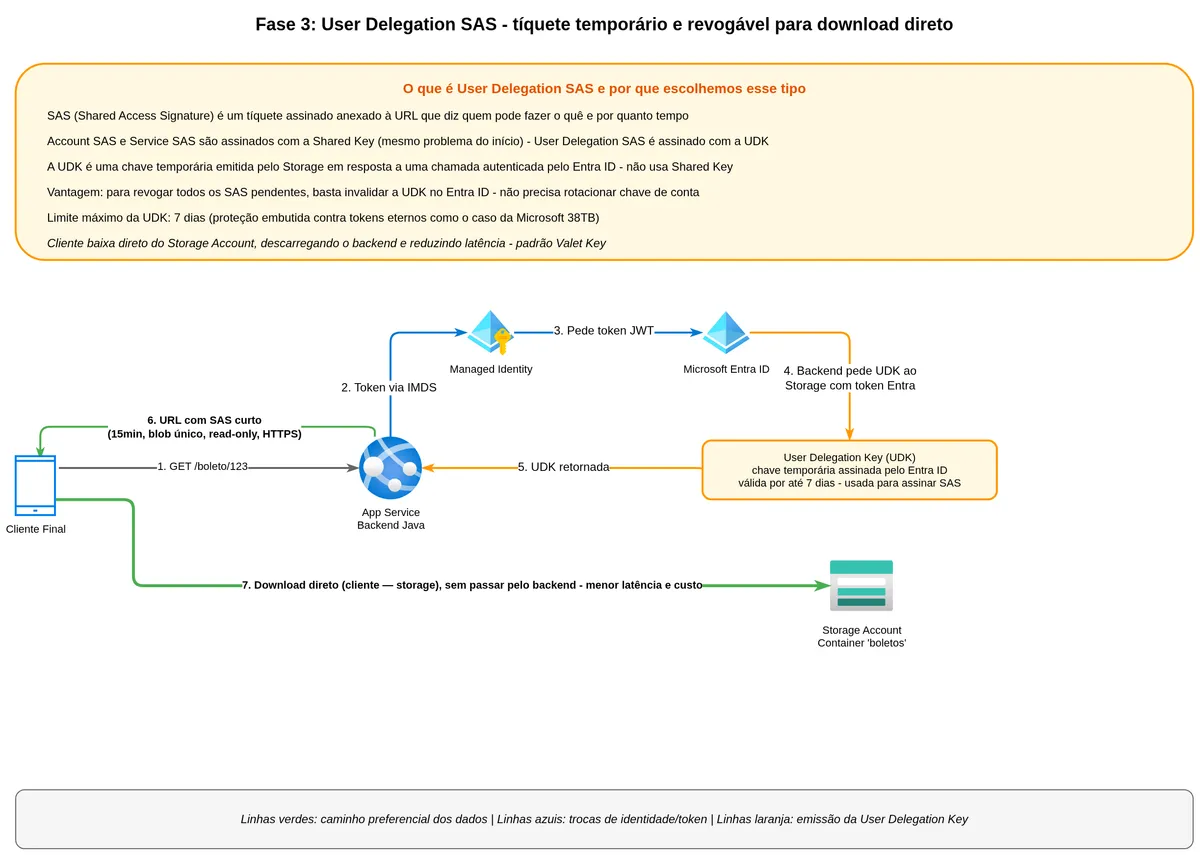
We solved the backend authenticating to storage without storing a secret. But we still need to deliver the bank slip to the end customer securely. If the backend downloads the PDF and returns it in the HTTP response body, it sits on the critical path of every data transfer. If it returns the blob URL directly without protection, anyone who intercepts or receives the URL can download the file.
The solution is the SAS token, Shared Access Signature.
What a SAS is and what it represents
A SAS is a cryptographic signature you append to the URL of an Azure Storage resource. When Azure Storage receives a request with that signature, it verifies that someone with legitimate authority issued that ticket and that its conditions are still valid.
Think of a SAS as a concert ticket. The ticket says: "whoever presents this can enter through door 3 on April 15th until 10 PM, with access to the VIP section." The issuer signed it. The door attendant verifies the signature and reads the conditions — no need to call the organizer. If the ticket has expired, entry is denied. The ticket carries everything needed for the decision.
A blob URL with a SAS looks like this:
https://myaccount.blob.core.windows.net/boletos/boleto-abc123.pdf
  ?sp=r
  &st=2026-04-25T14:00:00Z
  &se=2026-04-25T14:15:00Z
  &spr=https
  &sv=2021-06-08
  &sr=b
  &sig=AbCdEfGh...
Each parameter plays a role. sp=r means read-only. st and se are start and expiration times. spr=https enforces secure protocol. sr=b scopes the ticket to a single blob. sig is the cryptographic signature that ties all parameters together — alter any of them and the signature fails.
The three types of SAS and what each one means
There are three flavors, and the difference is who signs and what can be signed. Understanding this matters because the wrong choice here is exactly what cost Microsoft dearly in the 38TB incident.
The Account SAS is signed with the account's Shared Key and can cover any service within the account (Blob, Queue, Table, Files) with any combination of permissions. It is the most powerful and most dangerous. This is exactly what was used in the Microsoft incident, with expiration set to 2051 — practically infinite validity.
The Service SAS is signed with the account's Shared Key but limited to a specific service (Blob only, for example). It still uses the master key for signing, so invalidating it requires rotating the entire account key.
The User Delegation SAS is what Microsoft recommends.
"For scenarios in which shared access signatures are used, Microsoft recommends using a user delegation SAS. A user delegation SAS is secured with Microsoft Entra credentials instead of the account key, which provides superior security." (Microsoft Learn, Grant limited access to data with shared access signatures)
What the User Delegation SAS is and why it is different
The User Delegation SAS is signed not with the account's Shared Key, but with a User Delegation Key — a temporary key issued by Azure Storage itself in response to an Entra ID-authenticated request.
First, the backend (authenticated via Managed Identity) calls Azure Storage to request a User Delegation Key. Azure Storage checks whether the identity has permission to generate the key and if so returns a temporary key valid for a maximum of seven days.
Second, the backend uses that User Delegation Key to sign the SAS parameters: specific blob, read permission, fifteen-minute expiration, HTTPS-only protocol.
Third, the backend returns the SAS URL to the end customer. The customer downloads the blob directly using the URL, without going through the backend.
Fourth, to revoke all pending SAS tokens, the backend does not need to rotate the storage account key (which would break everything). It just revokes the User Delegation Key in Entra ID, and instantly all SAS tokens signed by that key stop working.
sequenceDiagram
    participant CLI as End Customer
    participant APP as Java Backend
    participant ENTRA as Microsoft Entra ID
    participant SA as Azure Storage
    APP->>ENTRA: Get token for Storage (via Managed Identity)
    ENTRA-->>APP: Managed Identity JWT token
    APP->>SA: POST getUserDelegationKey (with JWT token)
    SA->>ENTRA: Validate token
    ENTRA-->>SA: Token valid
    SA-->>APP: User Delegation Key (valid up to 7 days)
    CLI->>APP: GET /bank-slip/{id} (authenticated with API)
    APP->>APP: Generate User Delegation SAS (single blob, read, 15min)
    APP-->>CLI: URL with SAS signed by UDK
    CLI->>SA: GET boleto.pdf?[SAS params]
    SA->>SA: Verify signature with UDK
    SA-->>CLI: Bank slip PDF (direct, backend not in transfer path)
The revocability advantage is significant. With Service SAS, the only option to invalidate is to rotate the account key, which breaks everything depending on it. With User Delegation SAS, you revoke the specific UDK and only that batch of SAS tokens stops working.
The User Delegation Key has a maximum validity of seven days.
"User delegation key. The expiry time value must be within seven days of the start time of the SAS. If you specify an expiry time greater than seven days from the start time, the SAS will expire after seven days." (Microsoft Learn, Shared access signature tokens)
This is a built-in protection. You cannot create an infinite User Delegation SAS, because the key that signs it expires in at most seven days.
What happened at Microsoft with the misconfigured SAS
In June 2023, researchers at Wiz Research found a repository on Microsoft's AI research team's GitHub that contained a URL with an embedded SAS token. The token was configured as an Account SAS with "full control" permissions — not just read, but write and delete — and with expiration set to 2051.
"The simple act of sharing an AI dataset led to a significant data breach, exposing over 38 TB of private data. The root cause was the use of Account SAS tokens as the sharing mechanism. Due to a lack of monitoring and governance, SAS tokens represent a security risk and their usage should be as limited as possible." (Wiz Research, 38TB of data accidentally exposed by Microsoft AI researchers)
The URL was not pointing to the container of AI models the team wanted to share. It was pointing to the entire account, which contained 38 terabytes of data including employee machine backups, private keys, passwords, and over 30,000 internal Microsoft Teams messages.
What made the problem worse was that the SAS had write and delete permissions. Anyone who found that URL could not only read the data but also delete or replace it with malicious content. And for three years — from July 2020 until June 2023 — that link was live in a public open source repository on GitHub.
Three years of exposure with write and delete permissions on corporate data. The incident documents four missing controls: minimum scope, short validity, User Delegation instead of Account SAS, and active monitoring of issued SAS tokens.
The code with User Delegation SAS
public String generateDownloadUrl(String blobName) {
    BlobContainerClient container = blobServiceClient
            .getBlobContainerClient(containerName);
    BlobClient blob = container.getBlobClient(blobName);

    OffsetDateTime now = OffsetDateTime.now(ZoneOffset.UTC);

    // Request User Delegation Key from Azure Storage
    // authenticated with the service's Managed Identity
    UserDelegationKey udk = blobServiceClient
            .getUserDelegationKey(now, now.plusHours(1));

    // Define SAS permissions and conditions
    BlobSasPermission perms = new BlobSasPermission()
            .setReadPermission(true);

    BlobServiceSasSignatureValues values =
            new BlobServiceSasSignatureValues(now.plusMinutes(15), perms)
                    .setProtocol(SasProtocol.HTTPS_ONLY)
                    .setStartTime(now);

    // Sign the SAS with the User Delegation Key
    String sas = blob.generateUserDelegationSas(values, udk);

    return blob.getBlobUrl() + "?" + sas;
}
Note the parameters. Fifteen-minute validity means if the customer does not download within that window, the link expires and they need to request a new one. The link is designed to be disposable. Single blob means the SAS grants access only to boleto-abc123.pdf, nothing else. Read-only means the holder cannot write, delete, or rename. HTTPS-only means plain HTTP requests are rejected by Azure.
"Use short-lived SAS. Always set a near expiry time on a SAS so that, if a SAS is compromised, it is valid only for a short time. Azure Storage recommends one hour or less for all SAS URLs." (Microsoft Security Response Center)
There is also an important Storage Account-level configuration worth making: disable Shared Key authorization entirely.
"To prevent users from accessing data in your storage account using Shared Key, you can disallow Shared Key authorization for the storage account." (Microsoft Learn, Manage account access keys)
With this, even someone who has the account key cannot use it. Azure rejects any Shared Key-authenticated request. All access is forced through Entra ID — whether Managed Identity or User Delegation Key.
Third layer: finding the right blob and separating responsibilities
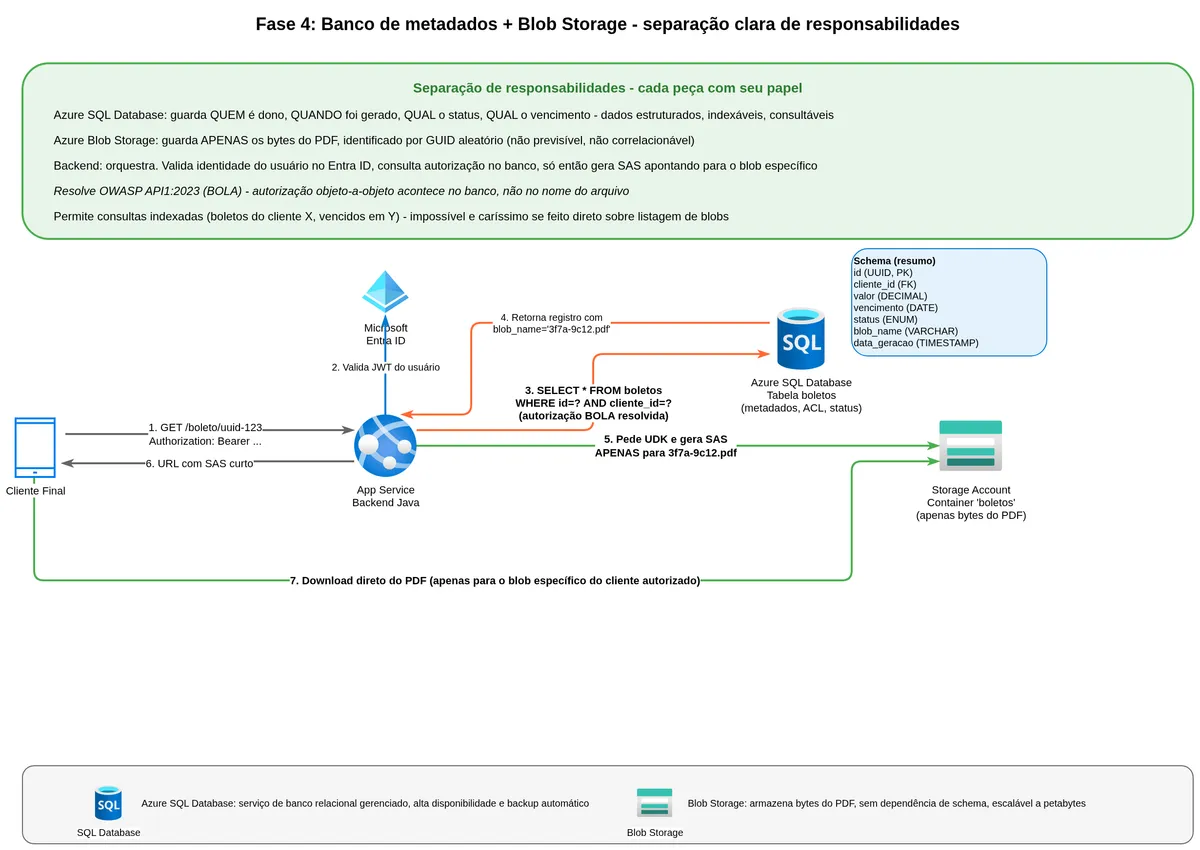
We solved authentication and secure delivery. We have not solved how to identify which blob corresponds to a specific customer's bank slip.
The naive answer is to list all blobs in the container and filter by name. That is a mistake that seems small at first and gets expensive quickly.
Why listing blobs is a problem
Blob Storage is object storage — a giant key-value repository where the key is the blob name and the value is the bytes. There is no native secondary index, no attribute-based search, no query. To find all bank slips for a given customer, you would need to list all blobs in the container and filter in application memory, which can mean millions of records in transit.
Beyond the computational cost, there is a financial one. Azure charges per API operation on Storage. Each listing page is one operation. For a container with ten million blobs, listing everything would be extremely expensive and slow.
"All requests made to the storage account, including requests made by lifecycle management policy execution, are charged at standard transaction rates." (Microsoft Learn, Azure Blob Storage lifecycle management overview)
The architecturally correct solution is to separate responsibilities clearly: the relational database knows who owns which bank slip, when it is due, what the status is. Blob Storage stores the PDF bytes. They integrate through a stable reference.
Separating metadata from content
The data model looks like this. The database has a bank slips table with columns like id (GUID), customer_id, due_date, amount, status, generated_at, blob_name. The blob_name field points to the corresponding blob in storage, and that blob_name is a GUID generated at creation time — not a predictable sequential number.
Using a random GUID as the blob name is also a form of pseudonymization. Even if the blob URL leaks into a log or APM trace, the GUID does not reveal whose document it is. To associate a blob with its owner, you need to cross-reference with the metadata table in the database, which is protected by separate authentication. This separation does not eliminate personal data, but reduces the risk of indirect exposure through URL leakage.
flowchart TB
    subgraph Relational Database
        TB[bank_slips table
id: uuid
customer_id: fk
due_date: date
amount: decimal
status: enum
blob_name: varchar]
    end
    subgraph Azure Blob Storage
        BL[(Container: boletos
3f7a9c12.pdf
9d1b2e45.pdf
7c4f8a33.pdf)]
    end
    TB -->|blob_name = '3f7a9c12.pdf'| BL
When a customer requests their bank slip, the flow passes through the database first: "does this customer_id have permission to see the bank slip with this id?" If not, the request is rejected before any interaction with the blob. If yes, the backend retrieves the blob_name from that record and generates the SAS pointing to that specific blob.
This pattern addresses BOLA (Broken Object Level Authorization) at the root. Authorization happens at the domain layer, with all business logic available, before any storage access. The blob name cannot be guessed because it is a GUID. And even if someone discovers the GUID, an expired SAS does not work.
flowchart LR
    CLI[Customer] -->|GET /bank-slip/id-123| APP[Java Backend]
    APP -->|SELECT * FROM bank_slips
WHERE id = 'id-123'
AND customer_id = 'customer-X'| DB[(SQL Database)]
    DB -->|blob_name = '3f7a9c12.pdf'| APP
    APP -->|Generate User Delegation SAS
for 3f7a9c12.pdf| SA[(Azure Storage)]
    APP -->|URL with SAS| CLI
    CLI -->|Direct download| SA
The separation also opens the door for reports, period-based queries, filtering by payment status, and access history. Blob Storage was not built for those queries, but the relational database was.
Fourth layer: isolating the network with Private Endpoints
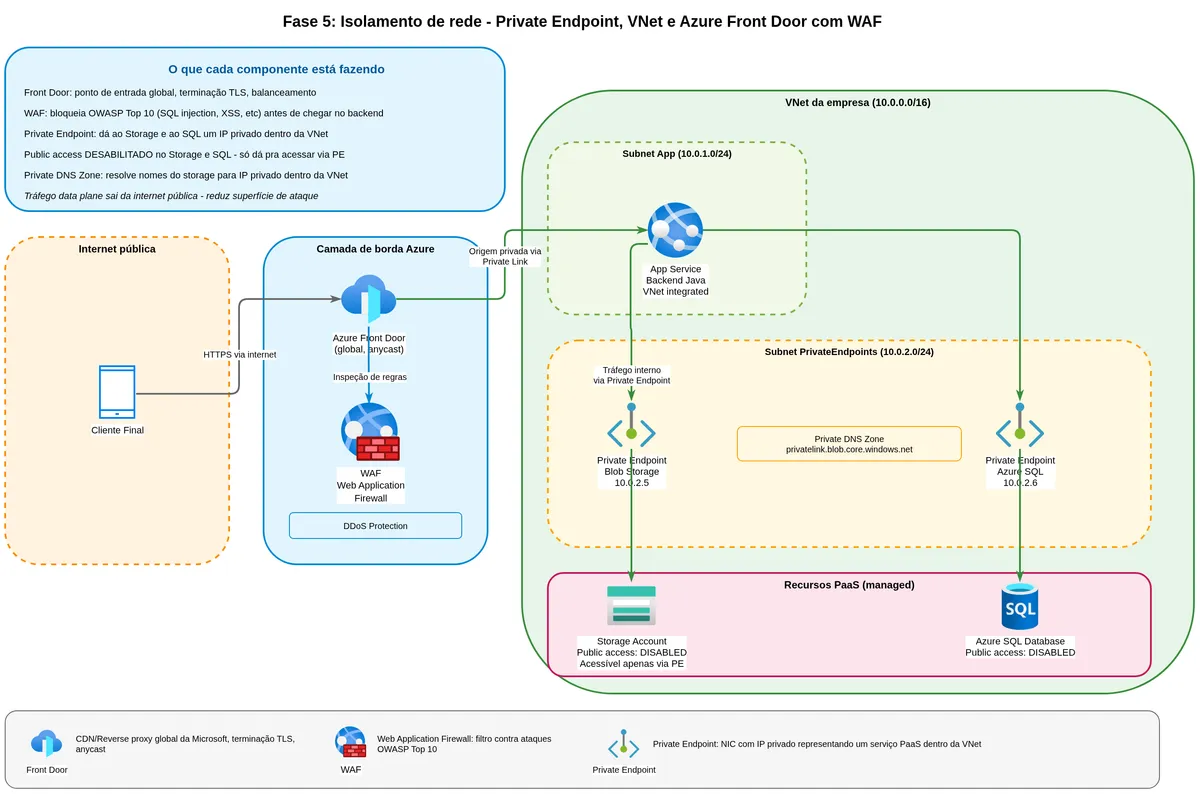
Even with identity-based authentication and well-scoped SAS tokens, the Storage Account still has a public endpoint accessible from the internet. The address myaccount.blob.core.windows.net responds to any incoming request, even if it ultimately rejects it for lack of authentication. That is a vector for reconnaissance (discovering the account exists), denial-of-service attacks against the public endpoint, and data exfiltration if an identity is compromised.
What a Private Endpoint is and what it changes
A Private Endpoint is a virtual network interface inside your VNet that represents a PaaS service (like Blob Storage) with a private IP address. Instead of communication going out through the internet and entering through Azure's public endpoint, it stays within the private network, traveling over Microsoft's backbone.
"You can use private endpoints for your Azure Storage accounts to allow clients on a virtual network (VNet) to securely access data over a Private Link. The private endpoint uses a separate IP address from the VNet address space for each storage account service. Network traffic between the clients on the VNet and the storage account traverses over the VNet and a private link on the Microsoft backbone network, eliminating exposure from the public internet." (Microsoft Learn, Use private endpoints for Azure Storage)
After creating the Private Endpoint, you configure the Storage Account firewall to deny access through the public endpoint. From that point, storage only responds to traffic from inside the VNet or peered networks.
"If you want to restrict access to your storage account only from the private endpoint, configure the storage firewall to deny or restrict access from the public endpoint." (Microsoft Learn, Use private endpoints for Azure Storage)
The trade-off: how does the end customer download?
If you close the public endpoint completely, the end customer on their phone at home cannot use the SAS URL for direct download. They are not on your VNet.
There are three paths. The first is to keep the public endpoint open for customer downloads, but block everything else (management operations, CI/CD, internal replication) through the Private Endpoint. This is pragmatic and works for most bank slip systems.
The second is to put an Azure Front Door or Application Gateway in front of the storage, which receives the customer's public request, terminates TLS, applies WAF and DDoS rules, and downloads the blob through the Private Endpoint before returning it to the customer. You lose the direct download advantage but gain much stronger protection with a centralized WAF.
The third path, for very sensitive environments, is to require a company VPN or zero-trust network access for any data access. This is not viable for consumer-facing bank slips, but it is appropriate for internal documents or corporate contracts.
flowchart LR
    subgraph Internet
        CLI[End Customer]
    end
    subgraph AzureFront
        FD[Azure Front Door
WAF + DDoS Protection]
    end
    subgraph VNet
        APP[Java Backend
Container Apps]
        PE[Private Endpoint
10.0.1.5]
    end
    subgraph Storage
        SA[(Azure Blob Storage
Public endpoint
disabled)]
    end
    CLI -->|HTTPS with SAS| FD
    FD -->|Private Link| PE
    PE --> SA
    APP -->|Private Link| PE
The Private Endpoint has an hourly charge for its existence and a per-gigabyte charge for traffic. For small volumes this can weigh proportionally. For a bank processing millions of bank slips per month, the cost dilutes quickly.
"Disable all public traffic to the storage account." (Microsoft Learn, Architecture Best Practices for Azure Blob Storage)
Fifth layer: Lifecycle Management, because old data costs money
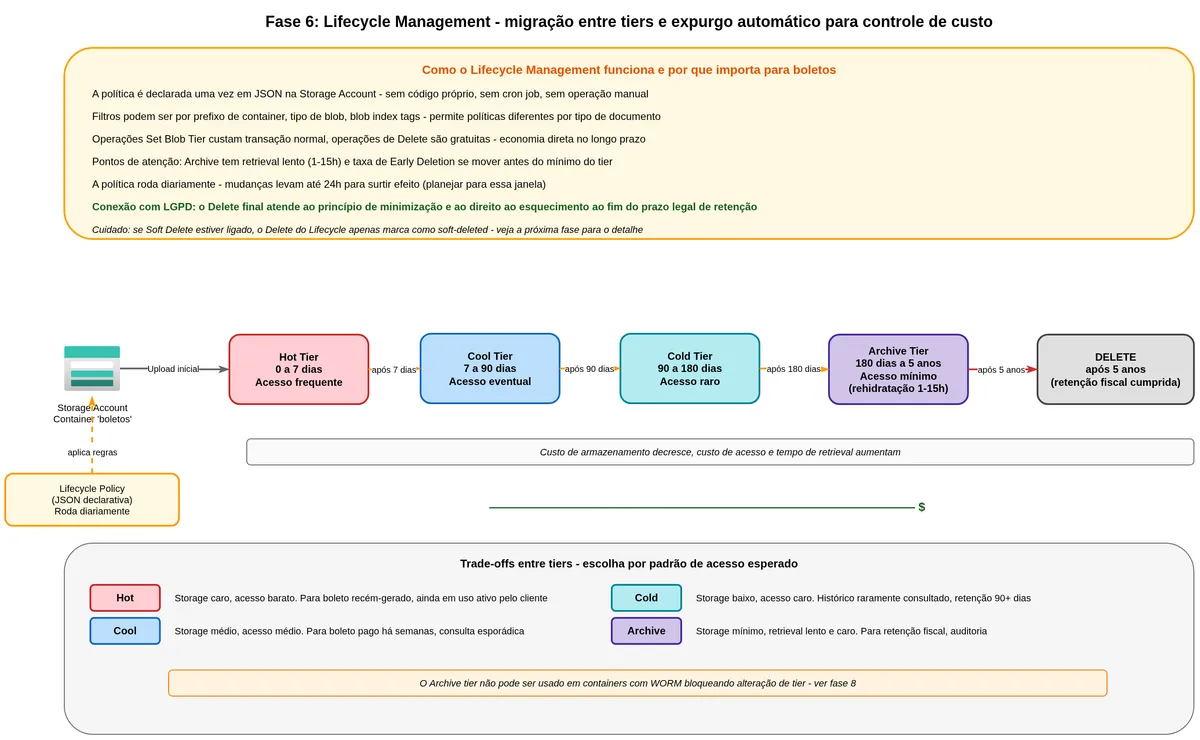
Everything we store costs money monthly. And in Azure, the cost per gigabyte varies significantly depending on how often you need to access that data. Azure Blob Storage has four access tiers, and understanding what each one represents is the starting point for an intelligent lifecycle policy.
What Hot, Cool, Cold, and Archive tiers mean
The Hot tier is for frequently accessed data. Storage cost is the highest, but access cost (reads, listing) is the lowest. For a recently generated bank slip that the customer will download several times in the coming days, Hot is the right tier.
The Cool tier is for infrequently accessed data, expected to stay there for at least thirty days. Storage cost drops, but per-read operation cost rises. For a bank slip paid two months ago that the customer rarely checks, Cool makes sense.
The Cold tier sits between Cool and Archive. Data expected to remain for at least ninety days, with even rarer access. A bank slip from a year ago that only gets consulted in audits or on customer request.
The Archive tier is dead storage. Storage cost is the lowest of all, but the data is "frozen" and cannot be read directly. To read a blob in Archive, you must first "reheat" it (called rehydration) to Cool or Hot, which can take between one and fifteen hours. Rehydration cost is high. Archive is suitable for tax documents that must exist for legal reasons but that almost nobody will actually request.
How Lifecycle Management works
Lifecycle Management is a declarative JSON policy you define at the Storage Account level. Once configured, Azure runs this policy daily and moves or deletes blobs according to the rules. No code needed, no scheduled jobs, no manual monitoring.
"Using blob lifecycle management, customers can proactively optimize costs through rule-based policies that automatically move data to cooler tiers or expire it when no longer needed." (Microsoft Learn, Azure Blob Storage lifecycle management overview)
A reasonable policy for bank slips:
{
  "rules": [
    {
      "name": "boleto-lifecycle",
      "enabled": true,
      "type": "Lifecycle",
      "definition": {
        "filters": {
          "blobTypes": ["blockBlob"],
          "prefixMatch": ["boletos/"]
        },
        "actions": {
          "baseBlob": {
            "tierToCool": { "daysAfterModificationGreaterThan": 7 },
            "tierToCold": { "daysAfterModificationGreaterThan": 90 },
            "tierToArchive": { "daysAfterModificationGreaterThan": 180 },
            "delete": { "daysAfterModificationGreaterThan": 1825 }
          }
        }
      }
    }
  ]
}
flowchart LR
H[Hot
0-7 days
Frequent access] --> C[Cool
7-90 days
Occasional access]
C --> CO[Cold
90-180 days
Rare access]
CO --> AR[Archive
180 days - 5 years
Minimal access]
AR --> DEL[Deleted
after 5 years]
style H fill:#ff8a80,color:#000
style C fill:#82b1ff,color:#000
style CO fill:#80d8ff,color:#000
style AR fill:#b388ff,color:#000
style DEL fill:#ccc,color:#000A few important notes. Tier change operations (Set Blob Tier) cost a normal operation fee. Deletion has no additional cost. Moving a blob to Cool or Cold before thirty or ninety days respectively triggers "early deletion" charges. The policy runs once per day, so changes can take up to 24 hours to take effect. And the policy cannot delete blobs that have an active WORM policy (addressed in the next section).
"Lifecycle management policies have no additional cost. Customers are billed at the standard operation rates for Set Blob Tier API calls. Delete operations are free." (Microsoft Learn, Azure Blob Storage lifecycle management overview)
Lifecycle Management is also the mechanism that ensures data is automatically discarded when its legal retention period expires. Without an automated policy, what happens in practice is indefinite accumulation because nobody has time to do manual deletion, and data remains stored without any legal basis to justify it. The policy configures this cycle in an auditable way, turning a legal obligation into a technical artifact verifiable during an inspection.
Sixth layer: Soft Delete and Versioning, the safety net against disasters
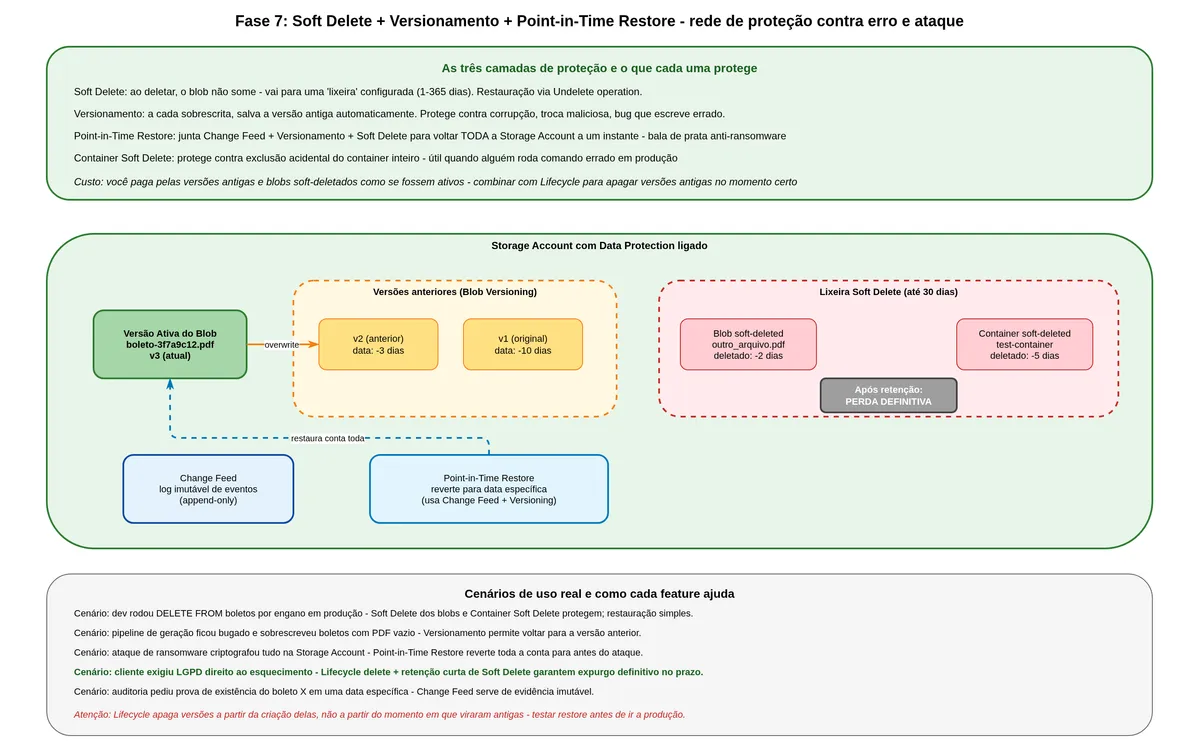
Picture this scenario: someone on the team deploys a version with a bug, and within forty minutes fifty thousand bank slips are accidentally deleted from storage. Or an attacker compromises an identity and runs a bulk deletion. Without protection, it is game over. With Soft Delete, you can recover everything.
What Soft Delete is and how it works
Soft Delete is a gentle removal mechanism. When you delete a blob with Soft Delete enabled, Azure does not immediately erase the data. It marks the blob as "soft-deleted" and retains the bytes for a configurable period (1 to 365 days). The blob disappears from normal listings but can be recovered with an "Undelete" command during the retention period. After the period expires, the data is gone for good.
"Blob soft delete protects an individual blob and its versions, snapshots, and metadata from accidental deletes or overwrites by maintaining the deleted data in the system for a specified period of time. During the retention period, you can restore a soft-deleted object to its state at the time it was deleted. After the retention period has expired, the object is permanently deleted." (Microsoft Learn, Soft delete for blobs)
Think of it as the Recycle Bin on your computer. Files go to the Recycle Bin when deleted. While there, you can restore them. When you empty it, there is no going back.
Soft Delete exists for individual blobs and for entire containers. Both work independently and it is recommended to enable both.
What Versioning is and how it complements Soft Delete
Versioning goes beyond Soft Delete. With it enabled, every time you overwrite a blob, Azure automatically saves the previous version. Each version has a unique identifier and you can access, copy, or promote old versions back to the current version.
The practical difference: Soft Delete protects against deletion. Versioning protects against deletion and against overwriting. If someone replaced a bank slip PDF with a corrupted or malicious file, Versioning lets you restore the good version.
"Microsoft recommends enabling container soft delete and blob versioning together with blob soft delete to ensure complete data protection for blob data." (Microsoft Learn, Soft delete for blobs)
A documented pitfall deserves attention. SingleStore published a case study about configuring Versioning and Soft Delete together without proper lifecycle policies for old versions. The lifecycle started deleting versions based on their creation date, not the date they became previous versions. During an incident recovery, versions they expected to still be available had already been removed.
"Azure counts the time to delete previous versions from the point in time when they were created. This can lead to data loss incidents (or a false sense of having data recovery capability)." (SingleStore, Lessons Learned From Using Azure Versioning and Soft-Delete)
The solution is to configure the lifecycle explicitly for old versions with enough days for a recovery window and to test the restore process in staging with production-like volumes before trusting it in a real incident.
Point-in-Time Restore, when you need to go back in time
If Soft Delete and Versioning protect item by item, Point-in-Time Restore protects the entire account at once. When enabled alongside change feed, versioning, and soft delete, it lets you restore all blobs to the state they were in at any instant within the configured retention window.
It is your silver bullet against ransomware attacks or catastrophic migration bugs.
flowchart TB
    BL[Current Blob] -->|Overwrite| V1[Previous Version 1]
    BL -->|Overwrite 2| V2[Previous Version 2]
    BL -->|Accidental Delete| SD[Soft Deleted
up to 30 days]
    SD -->|Undelete| BL
    PITR[Point-in-Time Restore
Select instant T] -->|Restore all blobs| EST[State at T]
Enabling this set — Soft Delete, Versioning, and Change Feed — has a cost. You pay for the storage of old versions and soft-deleted blobs as if they were active data. For bank slips with low modification volume (generated once, rarely overwritten), the extra cost is small. For frequently modified data, it can add up.
Seventh layer: WORM immutability, the protection even the administrator cannot undo
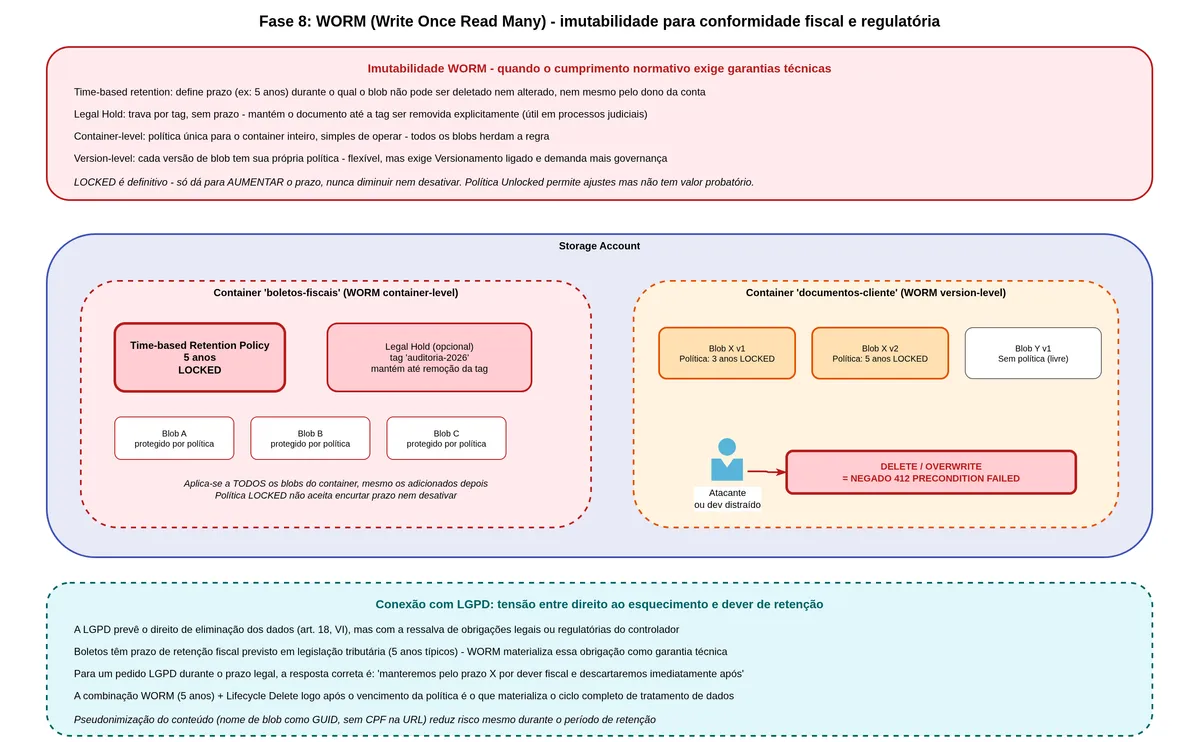
Soft Delete and Versioning protect against mistakes and against attackers with limited access. But what if the attacker compromises an identity with storage administrator permissions? Or if a malicious insider tries to destroy evidence? Soft Delete can be disabled by someone with the right permissions. Old versions can be explicitly deleted.
For this level of threat, there is WORM immutability.
What WORM means
WORM stands for Write Once Read Many. It is a model in which, after saving, data cannot be modified or deleted for a set period — by nobody. Not the developer, not the account administrator, not Microsoft support.
Azure Blob Storage implements WORM through immutability policies. You configure a policy on a container saying "any blob in this container is locked against modification and deletion for X days from the creation date." When this policy is locked, it cannot be shortened or removed — only extended.
"While an immutability policy is in effect, objects cannot be modified or deleted by users, administrators, or even Microsoft support, until the retention period expires." (OneUptime, How to Configure Immutable Storage with WORM Policies)
Azure validates this conformance with regulatory bodies. Azure Blob Storage immutability was evaluated by Cohasset Associates, an independent firm specializing in information governance, and validated as compliant with financial industry record retention requirements.
"Microsoft engaged a leading independent assessment firm specializing in records management and information governance, Cohasset Associates, to evaluate Azure immutable blob storage and its compliance with requirements specific to the financial services industry. Cohasset validated that Azure immutable storage, when used to retain blobs in a WORM state, meets the relevant storage requirements of CFTC Rule 1.31(c)-(d), FINRA Rule 4511, and SEC Rule 17a-4(f)." (Microsoft Learn, Overview of immutable storage for blob data)
Container-level WORM versus Version-level WORM
Container-level WORM applies the policy uniformly to everything in the container. Simple to configure, less flexible. Version-Level WORM lets you configure different retention periods for individual blobs or versions within the same container.
For bank slips, the appropriate design is a container with Version-Level WORM enabled and a default five-year retention policy. When a new bank slip is generated, it automatically inherits the five years. For specific cases with different retention requirements, the policy can be set at the individual blob level.
One critical warning: never lock a policy without testing first. The process is: create the policy in "unlocked" state, test the expiration, validate the period is correct, and only then lock it. Once locked, there is no going back — you can extend but not shorten or remove.
flowchart LR
    UP[Bank Slip Upload] --> CT[Container WORM
Version-Level]
    CT -->|Default policy
5 years| BL[Immutable Blob]
    BL -->|Lifecycle moves tier
without deleting| AR[Blob in Archive
still immutable]
    AR -->|After 5 years
policy expires| FREE[Can be deleted
by lifecycle]
There is an important interaction with the lifecycle: the lifecycle can move blobs between tiers (Hot, Cool, Archive) even with WORM active, but it cannot delete the blob while the retention policy is in effect. The lifecycle delete only happens after the WORM retention expires.
The cost trade-off here is genuine. With a five-year WORM, you are committed to paying for storage for five years regardless of contract cancellations, customer defaults, or any business event. For a regulated bank, this is accepted. For an early-stage startup, it may be prohibitive.
Eighth layer: encryption at rest and in transit
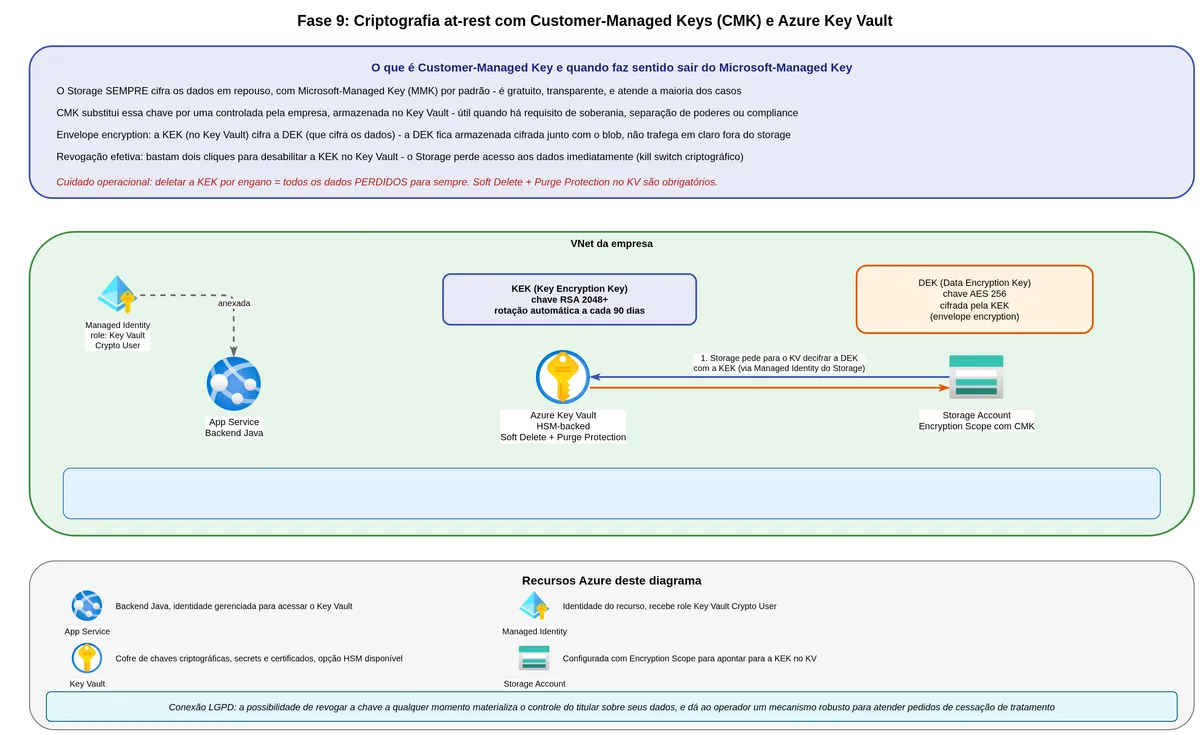
We have covered who can access the data (authentication), what they can do with it (authorization), and how long it remains available (lifecycle and retention). Now let us cover how the data is protected while stored and while in motion.
Encryption at rest: what happens to bytes on disk
Azure Storage encrypts all data at rest by default, using AES-256. The bytes of the bank slip PDF, when written to physical disks inside Microsoft's datacenters, are encrypted. Even if someone physically removed a disk, they could not read the data without the key.
"All Azure Storage resources are encrypted, including blobs, disks, files, queues, and tables. All object metadata is also encrypted. There is no additional cost for Azure Storage encryption." (Microsoft Learn, Azure Storage encryption for data at rest)
By default, the keys are managed by Microsoft, which rotates them automatically. For most cases, this is sufficient.
For environments with specific regulatory requirements, there is the option of Customer-Managed Keys (CMK). You create the key in Azure Key Vault (or the Key Vault Managed HSM, which is FIPS 140-2 Level 3) and instruct Storage to use it to encrypt the master data key. This process uses envelope encryption: Microsoft's key wraps the data, and your key wraps Microsoft's key.
The practical advantage of CMK is full control. If you disable or delete the key in Key Vault, the data becomes immediately inaccessible — a "kill switch" for extreme scenarios like court orders or severe environment compromise.
"When you configure customer-managed keys for a storage account, Azure Storage wraps the root encryption key for the account with the customer-managed key in the associated key vault or managed HSM." (Microsoft Learn, Customer-managed keys for account encryption)
The cost of CMK is operational complexity. You need to manage the Key Vault correctly — enabling soft delete and purge protection, configuring proper RBAC, monitoring key expiration. A poorly operated Key Vault can cause total storage unavailability if the key becomes inaccessible.
Encryption in transit: protecting data while it travels
When the customer downloads a bank slip via SAS URL, the bytes travel over the network. Azure Storage supports TLS and can be configured to require HTTPS for all calls.
The relevant setting on the Storage Account is "Secure transfer required." With it enabled, any plain HTTP request is rejected with a 400 error. And in the SAS token, the SasProtocol.HTTPS_ONLY parameter ensures the ticket only works over HTTPS.
Encryption at rest and in transit is the technical baseline expected in any regulatory inspection involving financial data. In the event of an incident, leaked data that was properly encrypted has a smaller reported impact because the attacker has the bytes but not their meaning. When CMK is chosen, revoking the key in Key Vault renders the data unreadable immediately — without needing to operate on each individual blob. This is the only mechanism that provides real-time cryptographic access discontinuation.
Ninth layer: monitoring, auditing, and Defender for Storage
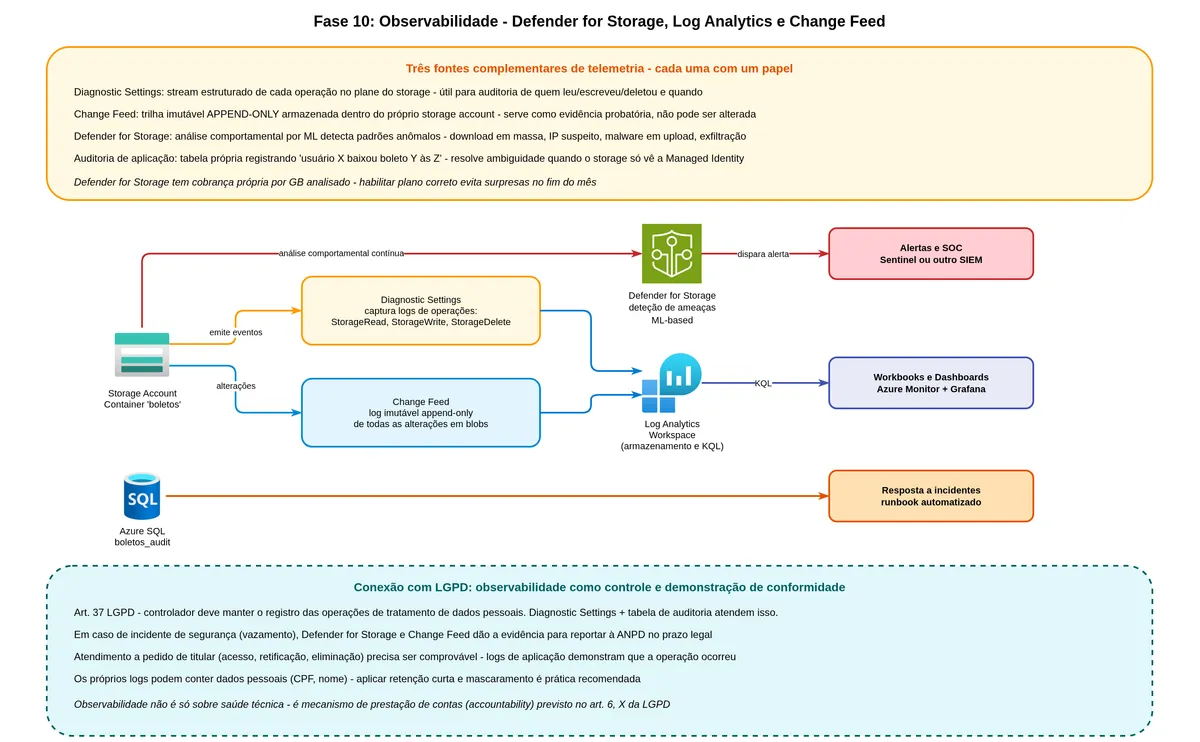
All the protection built up to this point assumes someone is watching for anomalies. Without observability, you can have every security layer in place and only discover a breach after the damage is done.
What Diagnostic Logs are and what they record
Azure Storage can be configured to send all its operation logs to a Log Analytics workspace or an Event Hub. These logs record every API call: who made it (which identity or IP), what was requested (operation, target blob), when, how long it took, what the response code was, and how much data was transferred.
With these logs in Log Analytics, you can build Kusto queries to detect suspicious patterns: many sequential reads of blobs belonging to different customers, large blob uploads outside business hours, access attempts with invalid tokens.
What Microsoft Defender for Storage is
Defender for Storage is a managed threat detection service that analyzes storage operation patterns using machine learning and Microsoft threat intelligence. It automatically detects situations like: file upload with a malware signature, suspicious access from an IP on threat intelligence lists, data exfiltration patterns (many downloads in a short period), anomalous SAS token generation.
For each detected threat, Defender issues an alert with details of what was found, the potential risk, and recommended next steps.
What Change Feed is and why it is different from a log
Change Feed is a feature specific to Azure Blob Storage that records in immutable, ordered form all changes (creation, modification, deletion) that happen to blobs. Unlike Diagnostic Logs, which are request-oriented, Change Feed is data-event-oriented.
The greatest utility of Change Feed for bank slips is as chain-of-custody evidence. If someone questions "did this bank slip actually exist on that date?", Change Feed says "yes, here is the creation event, with timestamp, size, and hash." This is valuable in audits and regulatory disputes.
flowchart LR
    SA[Storage Account] --> DS[Diagnostic Settings]
    DS --> LA[Log Analytics
Kusto Queries]
    SA --> CF[Change Feed
Immutable events]
    SA --> DEF[Defender for Storage
ML and intelligence]
    DEF --> AL[Automatic alerts]
    CF --> AUD[Audit and custody]
    LA --> MON[Dashboards and custom alerts]
Observability has a direct connection to the obligation to maintain records of processing operations and the requirement to notify authorities about incidents with identification of affected data subjects. Without Defender for Storage and Change Feed, scoping the extent of an incident becomes impossible. One point that is often overlooked: the diagnostic logs themselves contain personal data. They deserve shorter retention than primary storage and read-restricted RBAC for those operating security.
Mapping against the OWASP API Security Top 10
OWASP (Open Worldwide Application Security Project) is a nonprofit foundation that maintains lists of the most common vulnerabilities in software. The version specific to APIs, updated in 2023, is what we use here. The authors look at real incidents reported in bug bounty programs, published CVEs, and penetration tests, and classify by frequency and impact which problem classes appear most often.
Of the ten items on the 2023 list, five have direct relevance to the model we built: API1 (object-level authorization), API2 (authentication), API4 (resource consumption), API7 (SSRF), and API8 (misconfiguration). The remaining items — API3, API5, API6, API9, and API10 — cover object property-level authorization, function-level access control, business flow rate limiting, API inventory management, and secure consumption of third-party APIs. These classes apply to REST endpoint design and user-role permission control, which are outside the storage scope covered here. For each item covered, the analysis follows the same sequence: the vulnerability, how the attack happens in practice, and how the architecture responds.
API1, Broken Object Level Authorization (BOLA). This is the most common vulnerability in REST APIs. It occurs when the system authenticates the user (knows who they are) but does not authorize at the object level (does not check whether that user can access that specific object). The typical attack is to swap the ID in the URL. Authenticated user John makes a GET to /bank-slips/123 and receives his own bank slip. Then he changes it to /bank-slips/124 and receives Jane's bank slip, which was visible because the backend only checked that John was authenticated, not that bank slip 124 was his. It is also known as IDOR (Insecure Direct Object Reference) and is responsible for a large proportion of mass data leaks in APIs over recent years.
"Every API endpoint that receives an object ID and performs any type of action on the object should implement object-level authorization checks. The checks should validate that the logged-in user has permissions to perform the requested action on the requested object." (OWASP API Security, API1:2023 Broken Object Level Authorization)
API2, Broken Authentication. The failure is in the authentication mechanism itself. It could be a weak password, a poorly validated JWT token, missing expiration, a hardcoded secret, a broken refresh mechanism, or authentication that accepts an invalid signature. The Microsoft case with a SAS of fifty-year validity is of this type. There was nothing technically wrong with the credential, but the authentication mechanism accepted a token with no practical validity — equivalent to having no authentication. Another common case is an application secret accidentally published in a Git repository, discovered by attackers monitoring GitHub in real time within minutes.
API4, Unrestricted Resource Consumption. Formerly known as rate limiting issues. Every API consumes resources (CPU, memory, network, operational cost), and if the system does not impose limits, an attacker can take it down — or worse, run up a massive bill. In consumption-based systems like serverless functions or storage billed per operation, this is a double problem: besides unavailability, there is direct cost. An attacker can force bank slip generation in a loop, trigger repeated downloads, or initiate container listing operations, generating real expense.
API7, Server-Side Request Forgery (SSRF). The attacker exploits a legitimate application feature that makes HTTP requests to externally provided URLs. Imagine the backend has a feature to "fetch the issuing bank's logo from this URL." The attacker sends as the URL not a bank's public website, but the IMDS (Instance Metadata Service) endpoint where Azure resources obtain their Managed Identity token. If the backend makes the request without validating, it ends up returning the Managed Identity's own JWT token to the attacker. From there, exfiltrating data or moving laterally is just a matter of using the token like any authenticated call would. This was exactly the vector of the Capital One incident in 2019. The application running on AWS had permission to make HTTP requests to external URLs as part of its normal flow. A former AWS employee exploited this capability by sending the EC2 instance metadata endpoint as the URL. The returned token gave access to over 700 S3 buckets with data from more than one hundred million North American and Canadian customers. Capital One paid $80 million in a regulatory settlement.
"Defend against credential theft or abuse. For example, on AWS, require the use of IMDSv2 and block outbound access to the metadata service link-local endpoint from containers and functions." (Wiz, OWASP API Security Top 10 Risks)
API8, Security Misconfiguration. This is the "umbrella" for misconfiguration that opens up the system. A container publicly accessible when it should not be, optional TLS, missing security headers, CORS with *, a debug endpoint exposed in production, outdated software, permissive password policy. Most public data breaches fall here — not because the attacker was sophisticated, but because some configuration was left loose by mistake or by rush.
How the architecture maps to Brazilian data protection law (LGPD)
Note for international readers: LGPD (Lei Geral de Proteção de Dados, Law No. 13,709/2018) is Brazil's comprehensive data protection law, enacted in 2020. Its structure is comparable to GDPR: it establishes legal bases for processing personal data, data subject rights, controller and processor roles, security obligations, and incident notification requirements. The analysis in this section maps specific technical controls to LGPD articles. If your system operates under GDPR, CCPA, or another framework, the same technical controls apply — map them to your own legal basis and article references instead.
Before the technical mapping, two starting points that most discussions skip.
The first is identifying the roles. In a fintech that issues its own bank slips, the company is the controller (controlador), which defines the purposes and means of processing. If issuance passes through an external processor, that processor is the operator (operador) and requires a processing contract under the terms of Art. 39 of the law. Blob Storage and other Azure services are sub-processors, and Microsoft documents this in the DPA (Data Processing Agreement) available on the Service Trust Portal.
The second point is the legal basis. LGPD requires that every processing of personal data have a legal basis under Art. 7, and for bank slips two apply depending on the lifecycle phase. During the active period of the bank slip — before the due date and until settlement — the applicable basis is contract performance (Art. 7, V): the bank slip is the billing instrument tied to a contractual relationship with the payer. After payment, when data must be retained for a tax retention period, the basis becomes compliance with a legal obligation (Art. 7, II). For tax and regulatory purposes, this period is typically five years. This distinction matters because the legal basis conditions the justifiable retention period, and the justifiable retention period is what Lifecycle Management should reflect. Without this legal grounding, any period configured in the Lifecycle is arbitrary and indefensible in an inspection.
"This Law provides for the processing of personal data (...) with the objective of protecting the fundamental rights of freedom and privacy and the free development of the personality of natural persons." (Brazilian Law No. 13,709/2018, Art. 1)
With roles and legal bases defined, the link between each technical decision and the law principle it serves becomes verifiable.
The purpose limitation principle (Art. 6, I) is embodied in the SAS token scope. The issued ticket permits reading a specific blob for fifteen minutes. It is not possible to use the same URL to write, list, or delete. The minimum scope of the ticket is the technical floor of the declared purpose: the data is only accessible for the operation that motivated it.
The necessity principle (Art. 6, III) appears in two places. In the metadata-content separation: when the system queries the status of a bank slip, it accesses only the metadata database, without touching the PDF that carries the payer's complete personal data. And in Lifecycle Management, which ensures bank slips beyond the legal retention period are automatically deleted. Without this policy, what happens in practice is indefinite accumulation of personal data because nobody has time to do manual deletion.
The security principle (Art. 6, VII and Art. 46) is embodied in the sum of the layers, not in any single feature. Managed Identity eliminates the static credential leakage vector. Private Endpoint removes traffic from the public internet. AES-256 encryption at rest and mandatory TLS in transit protect the bytes. RBAC restricts who can do what. None of these layers alone satisfies Art. 46, but the set corresponds to what Brazil's National Data Protection Authority (ANPD) lists as adequate technical measures for financial data.
The accountability principle (Art. 6, X) requires a combination of layers. Diagnostic Settings exporting logs to Log Analytics, Change Feed recording event by event what happened to each blob, and the application audit table recording who requested which bank slip and when form a trail that makes it possible, during an inspection, to show evidence that the system operated according to the rules. Without this trail, notifying the ANPD about an incident with a description of its scope becomes impossible, because it is not even possible to identify which data subjects were affected.
The point of greatest tension with the law appears in the intersection between the data subject's right to erasure (Art. 18, VI) and the exception in Art. 16. When a data subject requests deletion of their data before the tax retention period expires, the company is not required to comply, but must respond informing that the data will be retained for the legal period and discarded as soon as that period ends. WORM with a locked policy makes that promise verifiable: it is not possible to delete before the locked period, not by the administrator, not by the support team, not by whoever processes a data subject request incorrectly. The chained Lifecycle Delete materializes the purge at the exact moment the legal retention expires.
One note about diagnostic logs and the audit table: they contain personal data. They deserve shorter retention than primary storage, read-restricted RBAC to those operating security, and periodic review of which fields actually need to be stored.
Complying with LGPD in this architecture does not come down to configuring the right features alone. The law requires documentation: a Privacy Notice describing how and for how long data is processed, a Data Protection Impact Assessment (DPIA) mapping the specific risks of payment data processing, and a processing contract with every operator involved. The architecture provides the material basis to support those documents, but they need to be built by the legal team working alongside the technical team.
Documented failure scenarios worth knowing
Theory becomes clearer when looking at real mistakes other companies made. The following five failure patterns appear frequently in pentests, post-mortems, and incident reports. Each one explains how the problem occurs, what the typical impact is, and how the architecture built here prevents or mitigates it.
Key forgotten in the repository
A developer creates an application.properties file with the storage connection string (which contains the Shared Key) during local development. When pushing the code to Git, the .gitignore was not configured, or the file had been committed before the rule was added. The secret ends up in the public repository history. Automated bots that monitor GitHub in real time, scanning millions of commits per day for AWS tokens, Azure keys, and Slack credentials, find the key within minutes. From there to the attacker discovering what data the account holds and exfiltrating it is a matter of hours.
The Microsoft 38TB case followed a variation of this pattern — with a SAS token instead of the account key directly — but the common point is the same: a static credential with broad permissions escapes the repository where it should have lived and ends up in the wrong hands. Manual rotation after the incident is painful, because every application using that key needs to be updated simultaneously.
The structural defense is to eliminate the concept of a static credential. With Managed Identity, there is simply no secret to leak. The token is requested at runtime, lasts about an hour, and an attacker who steals the source code will find nothing usable. As an additional layer, secret scanning in the pipeline (GitHub Secret Scanning, Gitleaks, TruffleHog) blocks the commit before it reaches the remote repository. And disabling Shared Key at the account level (allowSharedKeyAccess=false) ensures that even a historically leaked key no longer works.
The container nobody noticed was public
The developer is in a rush to demonstrate a feature. CORS is blocking, the browser complains about authentication, and the presentation is in twenty minutes. Quick fix: mark the container as public, show the demo, come back later to revert. Except "later" never happens. The demo passes, the ticket is closed, the team moves on, and the container stays public for weeks or months. Bank slips that should be protected are exposed to anyone who discovers the Storage Account name — and there are people scanning *.blob.core.windows.net subdomains specifically looking for public containers.
This pattern is common enough that dedicated tools exist (BlobHunter, GrayhatWarfare) that index public buckets and containers across the entire internet. The findings become news headlines with some regularity, typically involving health, financial, or legal data.
The defense is an Azure Policy at the subscription level blocking allowBlobPublicAccess=true. The policy does not rely on PR review or team training — it simply refuses to deploy any resource that attempts to enable public access. Combined with Private Endpoint and a storage firewall with defaultAction=Deny, even if someone circumvents the Azure Policy, the network door remains closed to the internet.
Using listing as a search mechanism
The team built the system without a metadata database, thinking it would simplify things. To find bank slips for a specific customer, the system lists the container filtering by prefix. It works with one thousand blobs in half a second. It works with one hundred thousand blobs in ten seconds. It keeps working until a production timeout blows up, or until the team notices that every listing is costing money because it counts as an operation. At real volume, the storage bill grows disproportionately to stored data volume, because most of the spend comes from operations, not from bytes.
Worse, listing is an inherently expensive operation in any object store. Azure Blob Storage uses a flat namespace, meaning prefix listing is an O(n) operation over the container's index. No optimization is possible — this is how it works architecturally.
The defense is the metadata-database-blob separation from day one. The database has indexes on the columns that will be queried (customer_id, due_date, status), and those queries are O(log n) with predictable performance. The blob is accessed by direct name (already known from the database), never by listing. Operation costs drop to the minimum necessary, and performance remains stable regardless of accumulated volume.
Versions deleted earlier than expected
The team configured the lifecycle to keep old versions for 90 days, assuming that meant 90 days after a version became old. During an incident, someone needed to recover a version from 60 days ago, and the versions had already disappeared. The reason was subtle. Azure counts the retention period for versions from the creation date of the version, not from the moment it stopped being the current version. A version created 100 days ago that became a previous version only 10 days ago has, in Azure's accounting, 100 days of life and was deleted by the 90-day policy.
"Azure counts the time to delete previous versions from the point in time when they were created. This can lead to data loss incidents (or a false sense of having data recovery capability)." (SingleStore, Lessons Learned From Using Azure Versioning and Soft-Delete)
The defense starts with a correct understanding of the semantics before configuring anything. Document clearly that the window is counted from creation, not from the transition to "previous version." Configure a window long enough considering the expected active lifespan of the blob. Test version recovery in staging with production-like volumes, simulating the incident scenario. And maintain a documented runbook for how to execute recovery, including the exact commands, so the team is not learning from a Google search while under incident pressure.
WORM locked with the wrong period
The team is setting up WORM for the first time. They apply the retention policy, configure it for "5 years," click "Lock." But they confused the unit and locked it for "5 days" instead of "5 years." A locked policy cannot be reduced, only extended. Any blob created in that container over the following 5 days will have only that protection window, and the entire compliance setup is compromised until the error is detected and the policy is rebuilt for new blobs.
This mistake is particularly cruel because WORM was designed precisely to prevent reversal. The immutability that protects against attacks also protects against honest human error.
The defense starts with an approval workflow. Every WORM policy should be reviewed by two people before being locked, following the principle of segregation of duties. Apply the policy as Unlocked first, observe behavior during a defined window, simulate recovery and validation, then run the Lock. Use Infrastructure as Code (Bicep, Terraform) so the configuration is explicit, versioned, and reviewed in a PR rather than done manually in the portal. And maintain separate containers for testing and production, with clear names that avoid visual confusion during operations.
The vendor lock-in question
After nine layers using Azure-specific features, it is honest to ask: how committed are we to this provider?
The answer requires separating two categories of dependency. The first is operational: everything was configured manually in the Azure portal, there is no declarative code, and migrating would require reconfiguring every resource on another provider. This kind of dependency is avoidable. Infrastructure as Code with Bicep or Terraform documents each configuration as versioned code, and most resources have equivalents on other providers: object storage in S3 or GCS, Private Endpoint in VPC Endpoint or Private Service Connect, WAF in CloudFront or Cloud Armor.
The second is behavioral dependency: services with specific characteristics that have no direct equivalent outside Azure. Azure Blob Storage WORM was evaluated and certified by Cohasset Associates for compliance with CFTC, FINRA, and SEC rules. That compliance attestation is specific to Microsoft and is not transferable to another provider without a new validation process. Change Feed has specific immutable, ordered log semantics with its own schema. Defender for Storage uses Microsoft's own threat intelligence that is not available elsewhere. If these controls are documented in a Data Protection Impact Assessment as compliance requirements, a migration stops being an infrastructure decision and becomes a regulatory decision.
For most companies, the practical approach is not multi-cloud native — which requires maintaining parallel infrastructure on two providers at the cost of a larger team and duplicated configurations. The approach that reduces risk without doubling complexity is to isolate the application domain from storage infrastructure from the start:
public interface BoletoStorage {
    void store(String id, byte[] pdf);
    String generateDownloadUrl(String id);
    void delete(String id);
}

public class AzureBlobBoletoStorage implements BoletoStorage {
    // Azure implementation
}
With this contract, the domain never depends directly on BlobServiceClient. Switching providers is an infrastructure decision confined to the implementation classes for each interface, not scattered across application logic.
Maintaining a documented exit plan means listing, somewhere versioned: which features without a direct equivalent are in use, what the regulatory dependency of each one is, and what the hypothetical migration path would be if the provider changes pricing, discontinues a service, or if the company needs to meet a customer requirement that prohibits Azure. This document does not need to be an executable project; it needs enough information to make a migration decision with verifiable numbers rather than assumptions.
Final composition: the complete picture
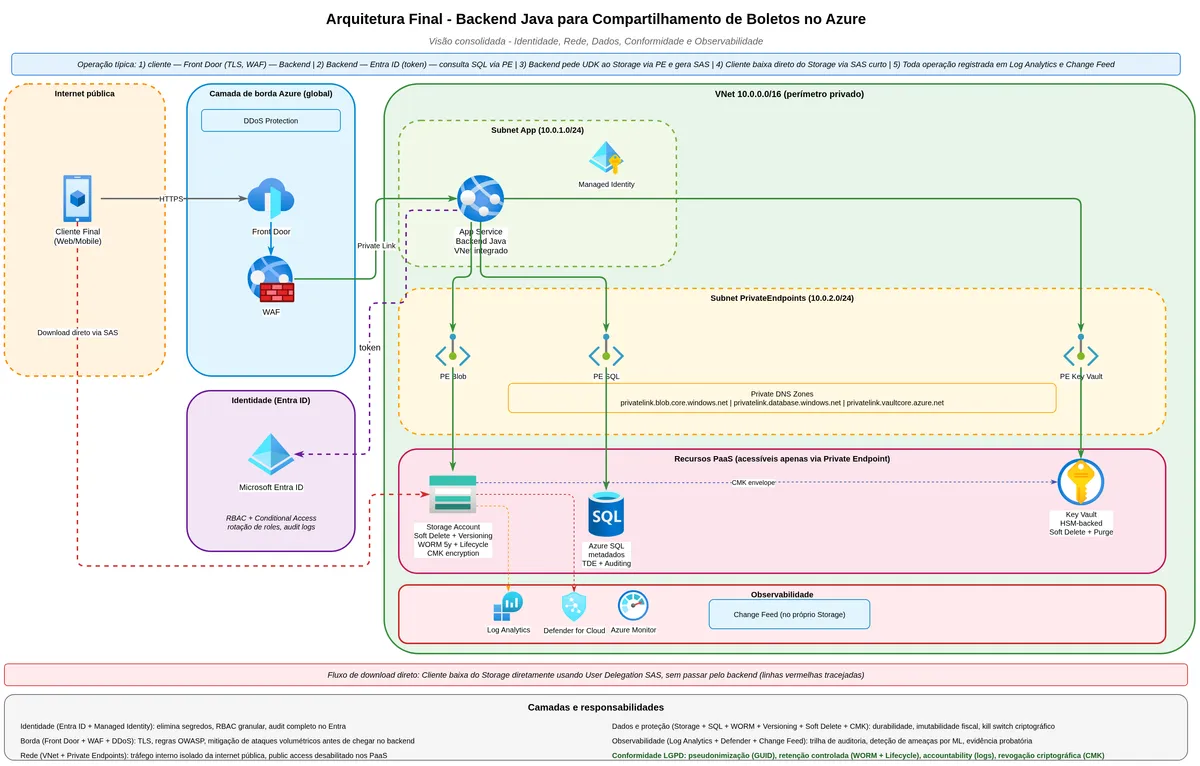
We started with a service with a connection string carrying the entire account's administrative key. Each layer added corrected a class of problem with a documented incident behind it. Managed Identity eliminated the static credential that Orca Security showed turning into a remote code execution vector. User Delegation SAS replaced the permanent URL with a disposable access ticket, fixing the class of problem that caused the 38TB leak at Microsoft. The database with ACL resolved OWASP's BOLA. Private Endpoint removed storage from the public internet. Lifecycle Management created the automatic deletion mechanism that data protection law requires. Soft Delete and Versioning added recoverability against mistakes and attacks. WORM formalized regulatory immutability. CMK gave the company direct control over the master key. Monitoring with Defender and Change Feed closed the audit trail.
The consolidated architecture:
flowchart TB
    subgraph Internet
        CL[End Customer]
    end

    subgraph FrontEdge[Edge Layer]
        FD[Azure Front Door
WAF + DDoS Protection]
    end

    subgraph VNet[Company Virtual Network]
        APP[Java Backend
App Service
Managed Identity]
        DB[(Azure SQL
Metadata and ACL)]
        KV[Azure Key Vault
CMK optional]
    end

    subgraph StorageLayer[Storage Layer]
        SA[(Container: boletos
WORM 5 years
Soft Delete 30 days
Versioning ON)]
        LOG[Diagnostic Logs]
        DEF[Defender for Storage]
        CF[Change Feed]
    end

    subgraph Obs[Observability]
        LA[Log Analytics]
        AL[Alerts]
    end

    CL -->|HTTPS| FD
    FD -->|Private Link| APP
    APP -->|User Delegation Key
generates SAS| SA
    CL -->|Direct download
via SAS| SA
    APP <-->|Metadata, ACL,
blob reference| DB
    APP -->|CMK wrap| KV
    SA --> LOG
    SA --> DEF
    SA --> CF
    LOG --> LA
    DEF --> LA
    CF --> LA
    LA --> AL
The diagram reads by layers of responsibility. The customer never accesses storage directly: the request arrives through Front Door, which applies WAF and DDoS protection before anything else. The backend does not transmit PDF bytes: it authenticates via Managed Identity, queries the database to verify that the customer has the right to the requested bank slip, generates the temporary SAS, and returns the URL. The customer downloads the blob directly from storage using that SAS, without the backend participating in the data transfer. Storage only responds within the VNet through the Private Endpoint, with the public endpoint disabled. Everything that happens in storage is recorded in real time by Diagnostic Settings, Defender, and Change Feed, which feed Log Analytics for queries and alerts.
When simplification makes sense
Everything described above has an explicit assumption: a financial or regulated system, at medium to large scale, with a mature operational team, and real compliance requirements. If you are building an MVP for a fintech still searching for product-market fit, not all of these layers make sense on day one, and trying to implement everything at once will kill the project before it starts delivering value. On the other hand, leaving all layers for later does not work either, because some early decisions are hard to reverse when the system is already in production with real data.
The practical criterion for deciding what to add when is to separate the cost of adding now versus the cost of adding later.
Layers with zero or low cost now and high cost later go in from day one. Managed Identity instead of Shared Key has zero additional cost, the same implementation complexity, and avoids having to migrate the entire authentication setup after dozens of applications already use Shared Key. HTTPS required is a checkbox, but going back to all clients asking them to switch from HTTP is a project. A metadata database from the start is the same work as storing everything in blobs, and avoids a data migration later with the system already running. SAS with short validity is the default you adopt, and if the team gets used to 15-minute SAS tokens, they will never propose month-long ones. Soft Delete enabled with 30-day retention costs cents more and saves you from the first accidental DELETE FROM.
Layers with high cost now but a clear window to add later can wait. Private Endpoint requires VNet planning, subnets, DNS configuration, and costs running instances. It makes sense when the product moves from MVP to production with real data. Lifecycle Management is easy to add later when the bill starts growing and becomes visible in Cost Management. Defender for Storage is a toggle — turn it on when the team can consume the alerts without drowning.
Layers with high cost specific to compliance go in when compliance comes in. Locked WORM makes sense when the product becomes regulated by Brazil's Central Bank (Bacen), CVM, or a similar body. CMK makes sense when an explicit audit requirement about key control appears, or when an enterprise customer requires it contractually. Before that, Microsoft-Managed Key (MMK) works perfectly.
The worst decision is premature overengineering: five people trying to implement a regulated bank's architecture for a product that does not yet have any users. The second worst decision is underengineering that becomes urgent technical debt at the worst possible moment — which tends to be right after the product starts doing well and the team has no time to rebuild. The balance is to start with the minimum defensible and have a clear map of what to add at each stage of the product.
Conclusion
The destination of this journey goes beyond the set of active features in the storage. What changes, after walking through the layers with the reason behind each one, is how you see an architecture.
Before this journey, a Storage Account with a connection string seemed sufficient. After it, the chain between a leaked account key and remote code execution in other parts of the infrastructure is visible — documented by Orca Security with a verifiable technical step-by-step. The chain between a misconfigured Lifecycle and personal data accumulating for years beyond the legal retention period is visible. The chain between an unscoped SAS token and a thirty-year Account SAS published in a public repository is visible — documented by Wiz Research with Microsoft's 38TB.
This visibility does not come from memorizing features. It comes from understanding the threat model behind each layer and the legal principle behind each retention decision. An attacker who compromises a well-configured Managed Identity reaches a token scoped to the bank slips container with one hour of validity. An attacker who compromises a Shared Key in an environment without these protections reaches full administrative access to the account, with the ability to escalate to other services in the environment, as documented by Orca Security.
The difference between those two scenarios is what justifies every layer added throughout this text.
Every security choice costs something in another dimension. CMK increases security and reduces operational excellence, because it introduces a critical dependency on Key Vault with soft delete, purge protection, and rotation to manage. WORM increases security and reduces cost optimization, because it commits the company to paying for storage for the locked period. Private Endpoint increases security and reduces performance efficiency, because it adds a network hop and requires correct internal DNS resolution. The architecture described here accepts these trade-offs because the use case — bank slips in a regulated environment — imposes these requirements.
Sources and references
The sources below are verifiable and have direct links to documentation or research cited in the text.
Shared Key and why to avoid it:
- Microsoft Learn, Manage account access keys: https://learn.microsoft.com/en-us/azure/storage/common/storage-account-keys-manage
- Microsoft Learn, Prevent Shared Key authorization for an Azure Storage account: https://learn.microsoft.com/en-us/azure/storage/common/shared-key-authorization-prevent
- Orca Security, From listKeys to Glory: https://orca.security/resources/blog/azure-shared-key-authorization-exploitation/
- The Register, Miscreants could use Azure access keys as backdoors: https://www.theregister.com/2023/04/11/orca_azure_access_keys/
SAS tokens and the 38TB incident:
- Microsoft Learn, Grant limited access to data with shared access signatures: https://learn.microsoft.com/en-us/azure/storage/common/storage-sas-overview
- Microsoft Learn, Create a user delegation SAS: https://learn.microsoft.com/en-us/rest/api/storageservices/create-user-delegation-sas
- Microsoft Learn, Create a service SAS: https://learn.microsoft.com/en-us/rest/api/storageservices/create-service-sas
- MSRC Blog, Microsoft mitigated exposure of internal information in a storage account due to overly-permissive SAS token: https://msrc.microsoft.com/blog/2023/09/microsoft-mitigated-exposure-of-internal-information-in-a-storage-account-due-to-overly-permissive-sas-token/
- Wiz Research, 38TB of data accidentally exposed by Microsoft AI researchers: https://www.wiz.io/blog/38-terabytes-of-private-data-accidentally-exposed-by-microsoft-ai-researchers
Managed Identity and Java authentication:
- Microsoft Learn, Authenticate Azure-hosted Java apps by using a system-assigned managed identity: https://learn.microsoft.com/en-us/azure/developer/java/sdk/authentication/system-assigned-managed-identity
- Microsoft Learn, Authorize access to blobs using Microsoft Entra ID: https://learn.microsoft.com/en-us/azure/storage/blobs/authorize-access-azure-active-directory
- Microsoft Learn, Get started with Azure Blob Storage client library for Java: https://learn.microsoft.com/en-us/azure/storage/blobs/storage-blob-java-get-started
- Microsoft Learn, Authenticate Java apps to Azure services: https://learn.microsoft.com/en-us/azure/developer/java/sdk/authentication/overview
Lifecycle Management:
- Microsoft Learn, Azure Blob Storage lifecycle management overview: https://learn.microsoft.com/en-us/azure/storage/blobs/lifecycle-management-overview
- Microsoft Learn, Lifecycle management policies that delete blobs: https://learn.microsoft.com/en-us/azure/storage/blobs/lifecycle-management-policy-delete
- Microsoft Learn, Azure Blob Storage lifecycle management policy structure: https://learn.microsoft.com/en-us/azure/storage/blobs/lifecycle-management-policy-structure
Soft Delete, Versioning, and Point-in-Time Restore:
- Microsoft Learn, Soft delete for blobs: https://learn.microsoft.com/en-us/azure/storage/blobs/soft-delete-blob-overview
- Microsoft Learn, Soft delete for containers: https://learn.microsoft.com/en-us/azure/storage/blobs/soft-delete-container-overview
- Microsoft Learn, Blob versioning: https://learn.microsoft.com/en-us/azure/storage/blobs/versioning-overview
- Microsoft Learn, Point-in-time restore for block blobs: https://learn.microsoft.com/en-us/azure/storage/blobs/point-in-time-restore-overview
- SingleStore Blog, Lessons Learned From Using Azure Versioning and Soft-Delete: https://www.singlestore.com/blog/lessons-learned-from-using-azure-versioning-and-soft-delete/
WORM immutability:
- Microsoft Learn, Overview of immutable storage for blob data: https://learn.microsoft.com/en-us/azure/storage/blobs/immutable-storage-overview
- Microsoft Learn, Container-level WORM policies for immutable blob data: https://learn.microsoft.com/en-us/azure/storage/blobs/immutable-container-level-worm-policies
- Microsoft Learn, Version-level WORM policies for immutable blob data: https://learn.microsoft.com/en-us/azure/storage/blobs/immutable-version-level-worm-policies
- OneUptime, How to Configure Immutable Storage with WORM Policies: https://oneuptime.com/blog/post/2026-02-16-how-to-configure-immutable-storage-worm-policies-azure-blob/view
Networking and Private Endpoints:
- Microsoft Learn, Use private endpoints for Azure Storage: https://learn.microsoft.com/en-us/azure/storage/common/storage-private-endpoints
- Microsoft Learn, Azure Storage firewall rules: https://learn.microsoft.com/en-us/azure/storage/common/storage-network-security
- Microsoft Learn, Azure Storage Network security overview: https://learn.microsoft.com/en-us/azure/storage/common/storage-network-security-overview
Encryption at rest and in transit:
- Microsoft Learn, Azure Storage encryption for data at rest: https://learn.microsoft.com/en-us/azure/storage/common/storage-service-encryption
- Microsoft Learn, Customer-managed keys for account encryption: https://learn.microsoft.com/en-us/azure/storage/common/customer-managed-keys-overview
- Microsoft Learn, Azure data encryption at rest: https://learn.microsoft.com/en-us/azure/security/fundamentals/encryption-atrest
Well-Architected Framework:
- Microsoft Learn, Azure Well-Architected Framework: https://learn.microsoft.com/en-us/azure/well-architected/
- Microsoft Learn, Architecture Best Practices for Azure Blob Storage: https://learn.microsoft.com/en-us/azure/well-architected/service-guides/azure-blob-storage
- Microsoft Learn, Microsoft Azure Well-Architected Framework pillars: https://learn.microsoft.com/en-us/azure/well-architected/pillars
OWASP API Security:
- OWASP, OWASP Top 10 API Security Risks 2023: https://owasp.org/API-Security/editions/2023/en/0x11-t10/
- OWASP, API1:2023 Broken Object Level Authorization: https://owasp.org/API-Security/editions/2023/en/0xa1-broken-object-level-authorization/
- OWASP, API2:2023 Broken Authentication: https://owasp.org/API-Security/editions/2023/en/0xa2-broken-authentication/
- Microsoft Learn, Mitigate OWASP API security top 10 in Azure API Management: https://learn.microsoft.com/en-us/azure/api-management/mitigate-owasp-api-threats
- Wiz Academy, OWASP API Security Top 10 Risks: https://www.wiz.io/academy/api-security/owasp-api-security
LGPD and data protection (Brazilian law):
- Lei nº 13.709/2018 (LGPD), full text: https://www.planalto.gov.br/ccivil_03/_ato2015-2018/2018/lei/l13709.htm
- Brazil National Data Protection Authority (ANPD), Information Security Guide for Data Processors: https://www.gov.br/anpd/pt-br/documentos-e-publicacoes/guia-de-seguranca-da-informacao-para-agentes-de-tratamento-de-pequeno-porte.pdf
- ANPD, Security Incident Notification: https://www.gov.br/anpd/pt-br/canais_atendimento/agente-de-tratamento/comunicado-de-incidente-de-seguranca-cis
- Microsoft, Brazil Data Protection (LGPD) compliance: https://learn.microsoft.com/en-us/compliance/regulatory/offering-lgpd-brazil